Prefer to do this by prompt? Connect iubenda to Claude or ChatGPT and set it up in the chat. See how it works
Hier lees je alles wat je moet weten over onze oplossing voor cookiebeheer:
⚙️ Take a look at this demo to see how the iubenda Privacy Controls and Cookie Solution works.
Inleiding tot de cookiewetgeving en het cookiebeleid
De ePrivacy-richtlijn 2002/58/EG (ofwel de cookiewetgeving) is vastgesteld om richtsnoeren te geven voor de bescherming van elektronische privacy, met inbegrip van e-mailmarketing en het gebruik van cookies, en is nog steeds van toepassing.
💡De cookiewetgeving is niet alleen van toepassing op cookies, maar ook, in bredere zin, op alle andere technologieën die informatie op het apparaat van een gebruiker opslaan of daar toegang toe hebben (bv. pixeltags, machinevingerafdrukken, unieke identificatoren enz.). Om het eenvoudig te houden worden al deze technologieën, met inbegrip van cookies, doorgaans trackers genoemd. In deze gids worden de termen cookie(s) en tracker(s) echter door elkaar gebruikt.
You can think of the ePrivacy Directive as currently “complementing” the GDPR in a sense, rather than being repealed by it.
Strikt genomen moet je, als je cookies gebruikt, eerst nagaan of je aan de cookiewetgeving voldoet, voordat je naar de AVG kijkt. De cookiewetgeving wordt in juridisch jargon namelijk een “lex specialis” genoemd, wat betekent dat deze prevaleert boven de AVG.
Directives, generally speaking, set certain agreed-upon goals and guidelines in place with Member States being mandated to implement these directives into national legislation..
Verordeningen daarentegen, zijn juridisch bindend voor alle lidstaten vanaf het moment dat zij in werking treden en worden toegepast volgens in de gehele Unie vastgestelde regels.
With that said, the ePrivacy Directive is, in fact, going to be repealed soon by the ePrivacy Regulation. The ePrivacy Regulation is expected to be finalized in the near future and will work alongside the GDPR to regulate the requirements for the use of cookies, electronic communications, and related data/privacy protection.
Verwacht wordt dat de verordening waarden zal handhaven die vergelijkbaar zijn met die van de richtlijn, en dat grotendeels dezelfde richtsnoeren van toepassing zullen zijn.
Wie valt onder de cookiewetgeving?
De tenuitvoerlegging van de cookiewetgeving hangt af van de wetgeving waaronder de site of app opereert.
In het algemeen is de cookiewetgeving op jou van toepassing als:
- you or your users are based in the EU; and
- you use cookies or similar technologies on your site/app.
Welke eisen stelt de cookiewetgeving?
Volgens de cookiewetgeving moeten organisaties die zich richten op gebruikers in de EU, gebruikers informeren over gegevensverzamelingsactiviteiten en hen de mogelijkheid bieden om te kiezen of zij hier al dan niet hun toestemming voor geven.
Dat betekent dat als je site/app (of een door je site/app gebruikte externe dienst ) cookies gebruikt, je eerst geldige toestemming moet verkrijgen voorafgaand aan het installeren van die cookies, behalve wanneer ze vallen in de categorie vrijgestelde cookies.
In de praktijk betekent dit dat je:
- show a cookie banner/consent banner at the user’s first visit;
- implement a cookie policy that contains all required information;
- allow the user to provide consent. Prior to consent, no cookies — except for exempt cookies — can be installed.
Further information about Cookie Law
For further details on the Cookie Law, we invite you to read our documentation and the official statements from the country you might be affiliated with or targeting. Great guidance can be accessed through the Article 29 Working Party (which is a group comprised of various data protection regulators that aim to simplify Europe’s diversity):
Here are the links to each countries specific application of the ePrivacy directive:
- Belgium: Commission de la protection de la vie privée (French | Dutch)
- Czech Republic: Úřad pro ochranu osobních údajů
- Denmark: Guidelines on Executive Order on Information and Consent Required in Case of Storing and Accessing Information in End-User Terminal Equipment
- France: Commission Nationale de l’Informatique et des Libertés
- Germany: EC Communications Committee Working Document on implementation
- Greece: Η χρήση cookies στο διαδίκτυο
- Ireland: Guidance note on Data Protection in the Electronic Communications Sector
- Luxembourg: Commission nationale pour la protection des données
- Netherlands: Autoriteit Consument en Markt
- Spain: Agencia de Protección de Datos
- UK: Information Commissioner’s Office
What is the iubenda Privacy Controls and Cookie Solution?
The iubenda Privacy Controls and Cookie Solution allows you to manage all aspects of the Cookie Law, in particular:
- easily inform users via cookie banner/consent banner and a dedicated cookie policy page (which is automatically linked to your privacy policy and integrates what’s necessary for Cookie Law compliance);
- obtain and save cookie consent settings;
- automatically block scripts that may install cookies/trackers on the website until the user gives consent via the auto-blocking feature; and
- keep track of consent and save consent settings for each user for up to 12 months from the last site visit.
Je kunt toestemmingen verzamelen via verschillende mechanismen, waaronder verder browsen, scrollen en/of specifieke klikhandelingen. Houd er echter rekening mee dat toegestane toestemmingshandelingen kunnen verschillen afhankelijk van de wetgeving van de lidstaat.
Hieronder vind je alle nodige stappen om iubenda te gebruiken, zodat je in ieder geval aan de cookiewetgeving voldoet.
Een cookiebeleid genereren met iubenda
- Go to the dashboard and select the privacy policy for which you want to generate a cookie policy (included in all plans).
- Click on Edit in “Privacy and Cookie policy”, you will notice a “Cookie Policy” box in the right column:

- Click on Activate cookie policy: your cookie policy will be generated automatically based on the configuration of your privacy policy.

How to add the cookie banner
Click on Generate now under Dashboard > [Your website/app] > Privacy Controls and Cookie Solution:
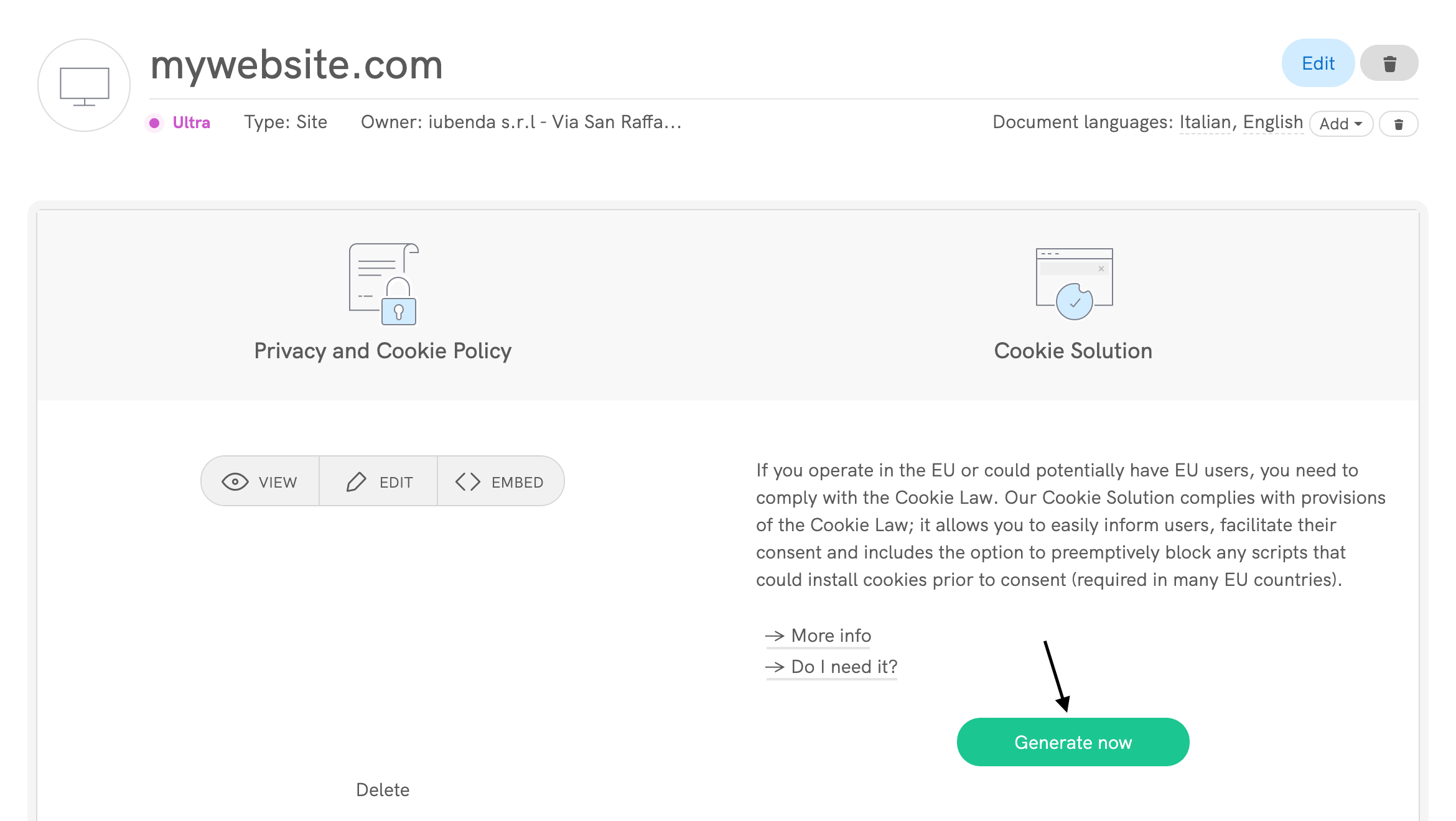
This will take you directly to the configuration panel of your cookie banner/consent banner:

Als je het hebt opgeslagen, krijg je een vergelijkbaar codefragment:
Simply copy and paste it into the head tag of your website’s HTML as the first element. Alternatively, you can use one of our plugins: currently we have plugins available for WordPress, Joomla!, PrestaShop and Magento.

Important
Don’t use the code shown above, it’s just a sample code. Instead, use the code attached to your cookie policy, which you can obtain by following the steps listed above. For information on how to configure or customize the banner or to better understand how to access all of the available options, please read the documentation on the cookie banner/consent banner.
💡 Using advertising services?
If you rely on advertising vendors, you may need to enable the IAB Transparency and Consent Framework (TCF). The latest version is TCF 2.3, and it can be activated later without changing your banner layout. 👉 Learn more about enabling TCF 2.3 with iubenda.
Remote Configuration Feature
The remote configuration feature makes it easier to update your Privacy Controls and Cookie Solution settings by applying most changes directly to your website—no re-embedding needed.
What’s New?
With the latest update, the new snippet now includes all components of the Privacy Controls and Cookie Solution. This means every change in the banner, including Custom CSS, TCF tile, and US laws support, is automatically applied without re-embedding.
When saving your configuration, you’ll be notified if any changes still require re-embedding.
Please note:
- Users already using remote configuration (V1) will see a banner in their embedding section about the update.
- Legacy users can enable full remote configuration by selecting the “Enable Remote Configuration” checkbox in the configurator.

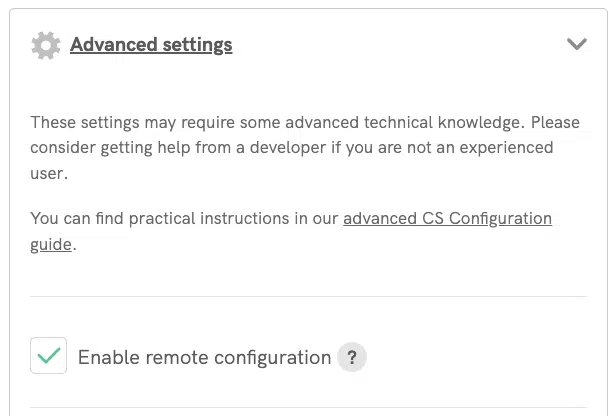
New configurations will have full remote configuration enabled by default.
Alleen toestemming van gebruikers in de EU vragen
The Privacy Controls and Cookie Solution also allows you to indicate whether or not you’d like to apply GDPR protections to the following:
- All your users. In this case, consent will be requested to all users of your site. This is the default setting.
- Only your EU users. In this case, consent will be requested to EU users only.
Here’s an example: a US-based e-commerce site has different sections available to users in the US and in Europe. They want to apply GDPR protections (i.e. show the cookie banner/consent banner) to just their EU-based users.
This is possible by checking the Request consent to EU users only located in Privacy Controls and Cookie Solution > Edit > GDPR. Once you check this option (in code gdprAppliesGlobally:false), you’ll be able to automatically detect the user country (in code countryDetection:true).

Here’s the Privacy Controls and Cookie Solution snippet you’ll get:
If you choose to request consent to EU users only, but prefer to implement your own country detection system, you’ll have to set gdprApplies:false on pages where consent is not required.
Meer informatie over instellingen voor het verkrijgen van toestemming vind je in onze geavanceerde gids.
Belangrijk
Als je in de EU bent gevestigd, ben je verplicht de bescherming toe te passen op alle gebruikers en niet alleen op gebruikers in de EU.
Codes/cookies preventief blokkeren – hoe en wanneer?
Volgens de Groep gegevensbescherming, een Europese denktank en adviesorgaan op het gebied van gegevensbescherming en privacy, zijn er maar weinig categorieën cookies die vrijgesteld zijn van het toestemmingsvereiste. Daarom moeten alle andere codes die cookies (kunnen) installeren preventief worden geblokkeerd voordat toestemming wordt verkregen.
Meer informatie en een technische handleiding voor het blokkeren van codes vind je in onze inleiding tot de voorafgaande blokkering van scripts en onze gids over handmatig taggen.
Gebruikersvoorkeuren documenteren
In de meeste gevallen kunnen cookies persoonsgegevens verwerken en zijn de registratievereisten van de AVG daarop van toepassing. Veel gegevensbeschermingsautoriteiten in de EU hebben hun voorschriften aangescherpt en hun regels inzake cookies en trackers in overeenstemming gebracht met de vereisten van de AVG.
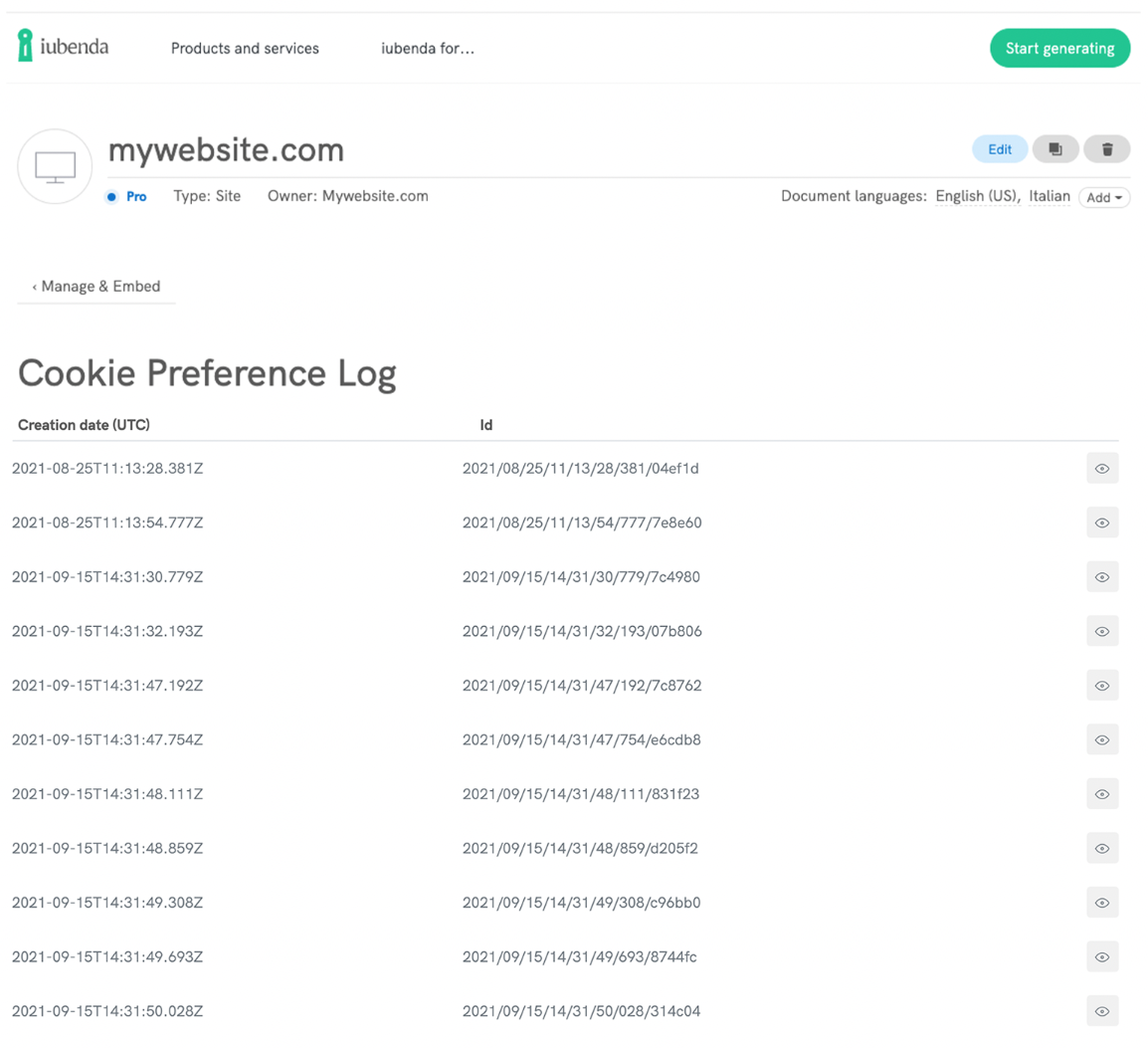
The Cookie and Consent Preference Log lets you store and manage GDPR proofs of your users’ consent preferences directly from the Privacy Controls and Cookie Solution. Integrate the feature with one click, and keep a verifiable record of every consent interaction.
How to access the Cookie and Consent Preference Log:
- If you’re on iubenda’s current pricing (all plans, including free): The Cookie and Consent Preference Log is already included in your plan. Go to Dashboard > [Your website/app] > Privacy Controls and Cookie Solution > Log to start viewing consent records.
- Legacy plan users: You need to upgrade to the 50,000 page views Privacy Controls and Cookie Solution plan or higher to activate this feature.
Not sure if you need the Cookie and Consent Preference Log? Take this 1-minute quiz to find out
You don’t need to configure anything. Once activated, the feature is included by default within the Privacy Controls and Cookie Solution. Click on Log under Dashboard > [Your website/app] > Privacy Controls and Cookie Solution:

In dit onderdeel kun je de logbestanden van verkregen cookievoorkeuren bekijken en beheren: