

With TCF 2.4, the latest version of the IAB Transparency and Consent Framework, consent management keeps evolving to meet regulatory expectations and improve transparency across digital advertising.
Laws like the General Data Protection Regulation (GDPR), the ePrivacy Directive and US state privacy laws have made consent management platforms (CMPs) essential for businesses in the EU, the UK, Switzerland and the United States, especially for publishers that rely on advertising.
This guide explains what a consent management platform is, why publishers need one, and how to enable and use the Transparency and Consent Framework (TCF 2.4) in our Privacy Controls and Cookie Solution.
Important
The deadline for TCF 2.4 is October 23, 2026 for websites, and February 23, 2027 for mobile apps and CTV (IAB Europe’s confirmation of the timeline).
TCF 2.4 adds standard texts and illustrations for Features, renames Special Feature 2 and, if you save consent with user accounts, requires your banner to say that choices also apply on every device where the user signs in.
We add the new Feature texts to your banner for you, and by October 23, 2026, we’ll set tcfVersion to 2.4 by default.
If you save consent with your users’ accounts, turn on the multi-device consent notice.
In short
- If you use cookies or trackers for advertising, analytics, remarketing or personalization, you likely need a consent management platform (CMP) like our Privacy Controls and Cookie Solution.
- Major advertising platforms (including Google) require valid GDPR consent signals before serving personalized ads in the EEA, the UK and Switzerland.
- You can meet this requirement by enabling the IAB Transparency and Consent Framework (TCF) in our Privacy Controls and Cookie Solution, in a few clicks.
- The IAB Transparency and Consent Framework (TCF) standardizes how consent is collected and shared across the advertising ecosystem.
- TCF 2.4 is the latest version of the framework. The deadline for websites is October 23, 2026.
- If you use iubenda’s Privacy Controls and Cookie Solution, we add the new texts for you, and you choose whether to turn on the multi-device notice.
- You can switch to TCF 2.4 now by setting
tcfVersion = 2.4, or let iubenda switch your configuration automatically by October 23, 2026. - If you save consent with your users’ accounts, turn on the multi-device consent notice.
What is a consent management platform (CMP)?
CMP is short for consent management platform (or, less commonly, consent management provider). CMPs also pass user consent along through the Transparency and Consent Framework (TCF), so they must be registered and meet TCF standards and policies.
Put simply, a CMP helps you tell users how their personal information is accessed and stored (through cookies and other trackers), in line with data privacy laws like the GDPR, the ePrivacy Directive and US state privacy laws.
More specifically, CMPs help you collect, store and use users’ preferences about how their personal information is processed for specific purposes (for example analytics, advertising and retargeting).
How iubenda helps
As a Google-certified CMP, iubenda lets you manage consent preferences for the ePrivacy Directive, the GDPR and US state laws like the CPRA and VCDPA.
Do I need a consent management platform (CMP)?
Short answer: yes, you probably need one, in two situations.
If the GDPR or the ePrivacy Directive applies to you
You need a CMP if the GDPR, the ePrivacy Directive, the UK GDPR or PECR applies to you (not sure? take our 1-minute quiz) and your site or app (or any third-party service it runs) uses cookies or other trackers to process personal information.
The reason: under the ePrivacy Directive (and PECR, its UK counterpart), you must clearly inform users about any cookies or trackers your site or app uses, and collect active consent before running scripts for non-exempt cookies and trackers.
Take publishers operating in Europe. Cookies and trackers are how they earn money from their site or app through third-party advertisers. Using trackers for behavioral advertising, remarketing and content personalization requires users’ informed consent before those trackers are installed.
What is a publisher?
A publisher is any site or app operator that earns money from its content through third-party advertisers. Blogs and online newspapers that show ads are examples of publishers.
If you have users in the United States
Beyond EU rules, US state laws give you good reasons to use a CMP too.
Some US state laws, such as the California Consumer Privacy Act (CCPA) as amended by the California Privacy Rights Act (CPRA), set precise rules for the format and label of the link to privacy controls, now called “Your Privacy Choices”.
The United States doesn’t require opt-in consent the way Europe does, and many states use an opt-out system. A CMP still helps: it gives users a way to opt out and helps businesses ask for consent again. This matters even more with signals like the Global Privacy Control (GPC), which lets users opt out automatically through their browser.
With privacy laws emerging worldwide, it’s hard to imagine a site or app that doesn’t need a consent management platform. A CMP makes compliance easier to manage and helps you keep up as laws change.
Built for publishers
As a Google-certified CMP, we’ve integrated IAB Europe’s TCF and the US state laws framework into our Privacy Controls and Cookie Solution, to help publishers meet legal and industry requirements while protecting their ad revenue.
What is the IAB TCF?
The IAB Transparency and Consent Framework (TCF) is a digital advertising initiative that helps publishers, technology vendors, agencies and advertisers meet the transparency, consent and choice requirements of the GDPR and the ePrivacy Directive when they process personal data or access and store information on users’ devices (such as cookies, advertising identifiers, device identifiers and other tracking technologies).
The IAB TCF provides a standard process for collecting GDPR consent and passing those consent preferences along the advertising supply chain. You can read the framework policies on the IAB Europe site.
What is TCF 2.4?
TCF 2.4 is the latest version of the IAB Europe Transparency and Consent Framework. It comes with an updated set of rules, the TCF Policies v5.0.b.
It builds on TCF 2.3, which made the “Disclosed Vendors” segment mandatory in all TC strings. TCF 2.4 focuses on helping users understand what they’re agreeing to.
What’s changed compared to TCF 2.3?
- Standard explanatory texts and illustrations for Features. Both come from the Global Vendor List (GVL), so every CMP shows the same wording
- Special Feature 2 is renamed “Identify devices based on information actively requested”
- Vendors that only process data for Special Purposes no longer need to signal Legitimate Interest to show they were disclosed. They rely on the Disclosed Vendors segment instead
- If you save consent with user accounts, the banner must also say that consent applies across devices
What did not change
- No new purposes or legal bases were introduced
- No new categories of personal data are collected
- The “Disclosed Vendors” segment remains mandatory in all TC strings
- No re-collection of consent is required in standard scenarios. IAB Europe has not required CMPs to show the consent layer again because of this update (see the TCF Policies)
The IAB TCF and UK law
The UK General Data Protection Regulation (UK GDPR) and the UK Privacy and Electronic Communications Regulations (PECR) are currently closely aligned with their EU counterparts (the GDPR and the ePrivacy Directive). So the TCF also helps companies meet the current requirements of both UK regulations.
How the TCF works
The TCF provides a system (a standard JavaScript API) that lets the different players in the advertising ecosystem speak the same language and pass the user’s preferences between them. The main players are publishers, vendors (third-party advertisers that collect end users’ data from the publisher’s site or app through cookies or other trackers, to serve content to the publisher’s users) and CMPs like iubenda.
Publishers, vendors and CMPs that take part in the IAB TCF must follow the standard framework protocol and policies. Vendors also register on the Global Vendor List (GVL), a central, regularly updated list of vendors, their purposes, maximum storage and access duration, and privacy policy URLs. The TCF and the GVL also standardize the purposes for data processing, and each purpose and each vendor has a unique ID. Vendors use this ID to read and interpret users’ consent preferences for their own services and other vendors’ services.
The user’s choices and the vendor signals collected through the CMP are stored as binary values, compressed into a small data structure (Base64) and passed along the online advertising ecosystem through a daisy chain.
The scripts of vendors on the GVL are blocked until the user makes a choice. Each vendor can check its status by pinging the CMP and waiting for a callback for the ID it passes, which tells it whether it can process personal data.
Why publishers should enable the Transparency and Consent Framework
The IAB TCF, first launched as version 2.0, has become the industry standard, with major vendors like Google, Adobe and AdRoll contributing to its implementation. The most recent iteration, IAB TCF 2.4, adds standard texts and illustrations that help users understand how their data is processed.
Enabling the TCF brings benefits for publishers and users: it helps protect ad revenue and lets publishers collect and pass user preferences to the third-party ad vendors they work with, with tighter control over how users’ data is processed.
IAB TCF benefits for publishers
The IAB Transparency and Consent Framework (TCF) has become the industry standard for managing consent and transparency in digital advertising. Many of the key benefits for publishers were introduced with TCF 2.2 and still apply under TCF 2.4.
Secure your ad revenue
- Advertising networks may limit access to their network or serve only non-personalized ads where TCF consent is not passed to vendors. This means your ad revenue could drop if you’re not using the framework. Publishers in Europe, the UK and Switzerland who use Google publisher products should especially consider IAB TCF.
- Implementing the TCF can help protect ad revenue, as it gives publishers more control and flexibility over the legal basis for working with vendors. This lets them keep earning from ads while processing data in a privacy-friendly way.
- The framework also helps organizations build trust with users through transparency and choice, which can increase engagement with ads when users feel their privacy is respected.
More options and control
- Since TCF 2.3, vendors receive an explicit signal confirming whether they were disclosed to the user, reducing ambiguity and strengthening accountability across the advertising supply chain.
These changes were introduced in TCF 2.2 and remain in force under TCF 2.4:
- Purposes: you have full control over which third-party ad vendors you work with and disclose to your users, and for which purposes these vendors may process personal information.
- Purpose 11 (Use limited data to select content) covers processing such as selecting and delivering non-advertising content based on real-time data (for example, information about the page content or non-precise location data), and controlling how often or in which order content is shown to a user.
- Legal basis: vendors, previously able to rely on both consent and legitimate interest for purposes 2 to 10 in TCF 2.0, can, starting with TCF 2.2 and continuing under TCF 2.4, only rely on consent for purposes 3, 4, 5 and 6. Stricter rules on data use and consent may affect ad targeting and revenue, but greater user trust and engagement can offset this.
- Publishers must select partners carefully and check that they follow TCF standards, which strengthens their reputation and favors partnerships with companies that share a commitment to user privacy.
- Introduced with TCF 2.2 and still applicable under TCF 2.4, the framework provides a standardized platform for publishers and third-party vendors, which supports compliance with data privacy regulations like the GDPR and the ePrivacy Directive.
Why you should work with a limited number of vendors
Publishers must disclose the total number of third-party vendors they work with, prominently, on the first layer of their CMP interface. The TCF Policies don’t set a limit on the number of vendors, but publishers are strongly encouraged to work only with the vendors that best meet their needs.
Too many vendors can make it harder for users to make informed decisions, and can increase legal risk for both publishers and vendors.
To help publishers decide which vendors to seek transparency and consent for, IAB publishes an additional vendor information list, known as the “B2B GVL”. It provides information that helps publishers avoid asking consent for vendors that operate in irrelevant technical environments or jurisdictions. It also shows the scope of each TCF vendor’s operations and whether they transfer data outside the EEA.
We recommend selecting your vendors through our Privacy and Cookie Policy Generator (the recommended method), so the Privacy Controls and Cookie Solution updates automatically. If you need more flexibility, you can also add vendors manually in the Privacy Controls and Cookie Solution configurator.
What a legal basis is and why you should restrict it
A legal basis is a lawful ground for processing personal data. The GDPR sets out six legal bases. In advertising, two are commonly used:
- the consent of the data subject
- the legitimate interest of the data controller
The TCF supports both legal bases. However, starting with TCF 2.2 (and still applicable under TCF 2.4), legitimate interest is no longer an acceptable legal basis for purposes 3, 4, 5 and 6. For these purposes, vendors can only rely on consent.
Also, some national data protection authorities, for example in Italy and Belgium, have excluded legitimate interest as a valid legal basis in advertising in general. That’s why it’s important to restrict it to “Consent only” if you operate in those countries. You can read more about country-specific requirements in our cookie consent cheatsheet.
Do these changes require re-establishing the legal basis for all users?
No, the TCF Policies do not require re-establishing legal bases and therefore do not require CMPs to resurface the interface. The standardization improvements introduced in TCF 2.2 and still applicable under TCF 2.4 focus on how information and choices are structured, rather than on introducing new purposes or legal bases. Publishers should review the information they provide in their CMP interfaces and make a case-by-case determination, taking into account their specific needs, operating context, and local Data Protection Authority requirements.
Google and the IAB TCF
Google supports the IAB TCF and is part of the TCF Global Vendor List. If you serve ads through Google publisher products (AdSense, Ad Manager or AdMob) in the EEA, the UK or Switzerland, you must use a Google-certified consent management platform (CMP) to collect and signal valid user consent.
iubenda and Google
iubenda, as a registered IAB TCF Consent Management Platform (CMP) and a Google CMP Partner, supports TCF 2.4, offering all the assistance and support you require. Therefore, using iubenda’s tool helps you meet Google’s standards when displaying ads to audiences in Europe, the UK, and Switzerland.
With these requirements, Google aims to make ad consent requests clearer and more reliable, and to make sure ads respect people’s privacy rights.
With iubenda, you can switch to TCF 2.4 now or let us handle the transition automatically.
What about ad vendors that are not yet part of the TCF?
The framework includes a growing list of ad vendors, but some advertisers, including some of Google’s partners, are not part of the TCF yet. For them, Google has defined a technical specification called Additional Consent Mode. It’s meant to be used only alongside the TCF, as a bridge for Google’s Ad Tech Providers that are not yet registered on the TCF Global Vendor List.
Additional Consent Mode
The iubenda CMP supports the TCF integration requirements set by Google, including Additional Consent Mode.
IAB TCF benefits for end users
The IAB Transparency and Consent Framework (TCF) improves transparency and brings more standardization to the information and choices users get about the processing of their personal data. It also clarifies how these choices should be recorded, passed on and respected.
Many of the user-facing improvements were introduced with TCF 2.2 and still apply under TCF 2.4. TCF 2.4 adds standard texts and illustrations for Features and, if you save consent with accounts, a statement that choices also apply across devices.
Key benefits for end users include:
- Consent-centric processing: starting with TCF 2.2 and still applicable under TCF 2.4, vendors can no longer rely on legitimate interest for certain advertising and content personalization purposes. For purposes 3, 4, 5 and 6, vendors must rely only on user consent, giving users stronger control over how their data is processed.
- Clearer user information: the framework provides more user-friendly descriptions and real use cases instead of complex legal text. This helps users understand the purposes and features of data processing and make more informed choices. TCF 2.4 adds standard texts and illustrations for Features.
- Standardized vendor information: vendors must disclose more detail about their data processing, including the types of data collected, data retention periods for each purpose, any legitimate interests involved and multilingual support for URL declarations.
- Transparent vendor count: publishers must show the total number of vendors seeking to establish a legal basis on the first layer of their interface, so users can make informed decisions.
- Easier consent withdrawal: publishers and CMPs must give users easy ways to reopen the consent interface and withdraw their consent. Vendors must also retrieve the Transparency and Consent String in real time when needed.
- Clear consent scope: the banner tells users their choice applies to your site and, if you save consent with accounts, on every device where they’re signed in.
iubenda and the IAB Transparency and Consent Framework (TCF 2.4)
Implementation timeline
TCF 2.4 timeline (confirmed by IAB Europe):
- October 23, 2026: deadline for websites. CMPs need to show the new Feature texts and disclosures by this date
- By October 23, 2026: iubenda sets
tcfVersionto 2.4 by default - February 23, 2027: deadline for mobile apps and CTV
Previous update, TCF 2.3:
- June 19, 2025: TCF 2.3 announced by IAB Europe
- February 1, 2026: iubenda starts storing consent in the TCF 2.3 format
- February 28, 2026: deadline for TCF 2.3. TCF 2.2 strings created before this date remain valid
About our CMP
Our cookie consent manager for the ePrivacy Directive, the GDPR and US state privacy laws lets you show a fully customizable cookie banner, collect cookie consent and block scripts until consent is given.
As a registered consent management platform (ID 123), the iubenda Privacy Controls and Cookie Solution lets users set advertising preferences and works with the IAB Transparency and Consent Framework. Users can toggle advertising preferences for the advertisers on the IAB Global Vendor List.
1. Enable the IAB Transparency and Consent Framework
With TCF 2.4, the Transparency and Consent Framework continues to evolve while remaining fully supported in iubenda’s Privacy Controls and Cookie Solution. TCF 2.4 changes some of the text in your banner, and we add the new Feature texts and illustrations for you.
The easiest way to set it up is our Privacy and Cookie Policy Generator (the recommended method). If you need more flexibility, you can also add vendors manually in the Privacy Controls and Cookie Solution configurator.
To enable the TCF, go to your dashboard and click the site or app you want to update.
Start with your vendors
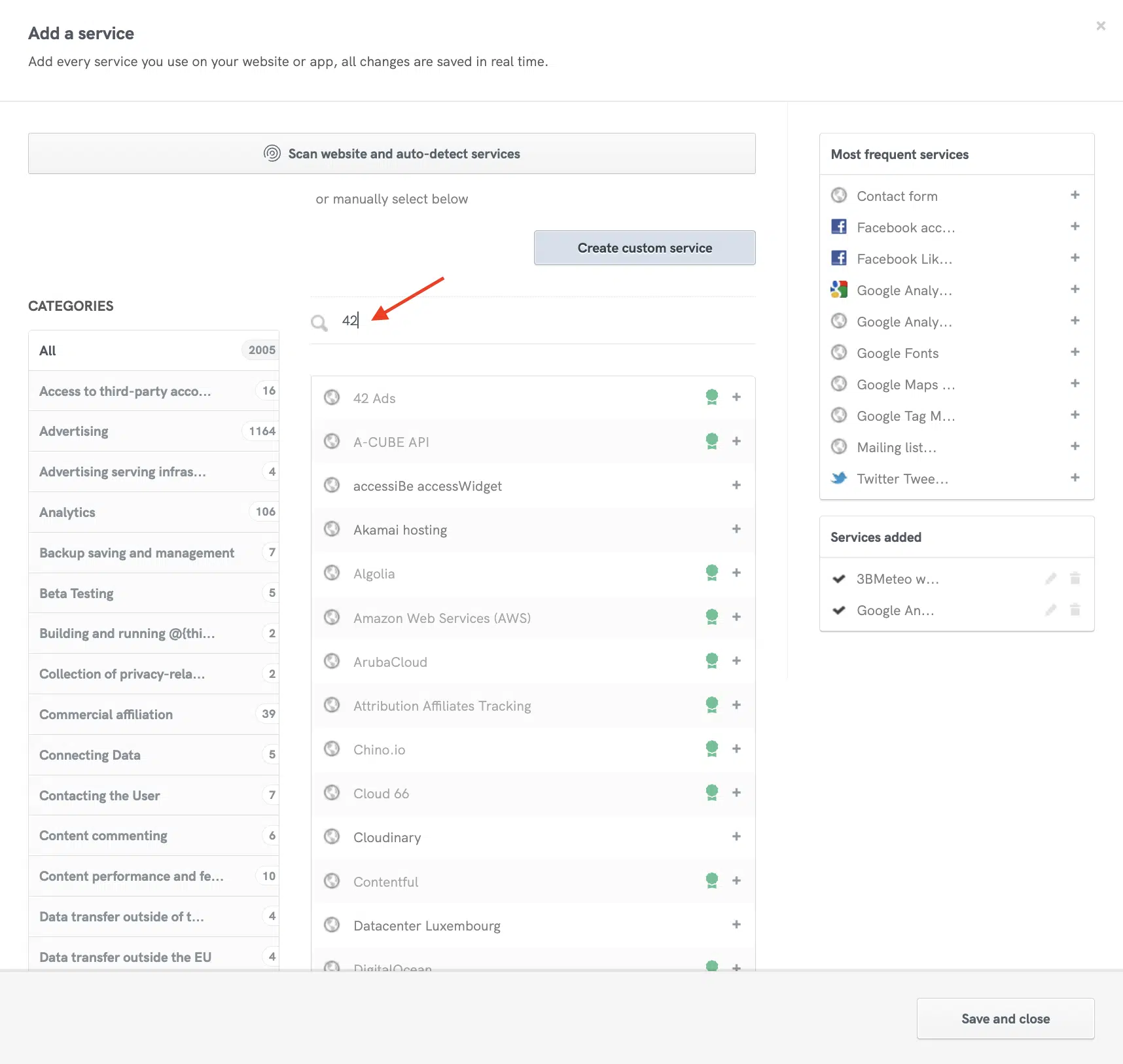
First, select the vendors you use through our Privacy and Cookie Policy Generator.
Use our Privacy and Cookie Policy Generator (recommended)
- In the Privacy and Cookie Policy Generator:
- select the TCF vendors you use from the services list
- Then, in the Privacy Controls and Cookie Solution configurator:
- turn on the IAB TCF tile (if it isn’t on already)
- the Privacy Controls and Cookie Solution updates automatically whenever you add or remove a TCF service in your Privacy and Cookie Policy. The configurator then shows the number of vendors added, and the banner and TCF panel update to match
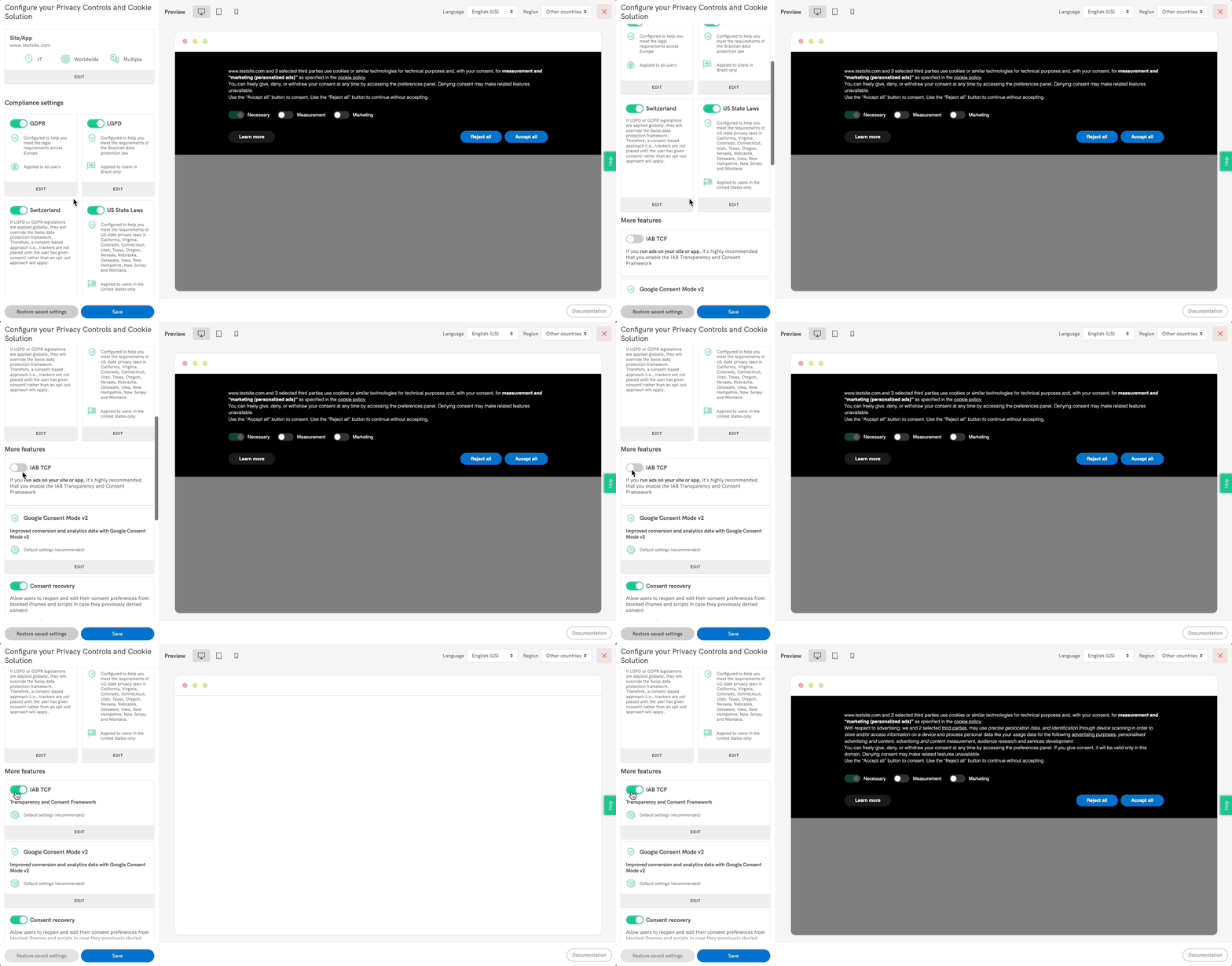
Haven’t set up the Privacy Controls and Cookie Solution yet? Here’s how to get started.
Managing Google Consent Mode with the TCF
Turn on the “Manage Google Consent Mode consents status within the TCF string” option to have Google infer the Consent Mode states for ad_storage, ad_user_data and ad_personalization directly from the TCF string.
Add vendors manually
- Select “Manually enter the list of TCF vendors you want to display”, then add the vendor IDs, separated by commas. You’ll find the list and more vendor information in the Global Vendor List and the additional vendor information list.
- With the TCF enabled in the Privacy Controls and Cookie Solution configurator, you’ll see an alert if no TCF vendors are found.
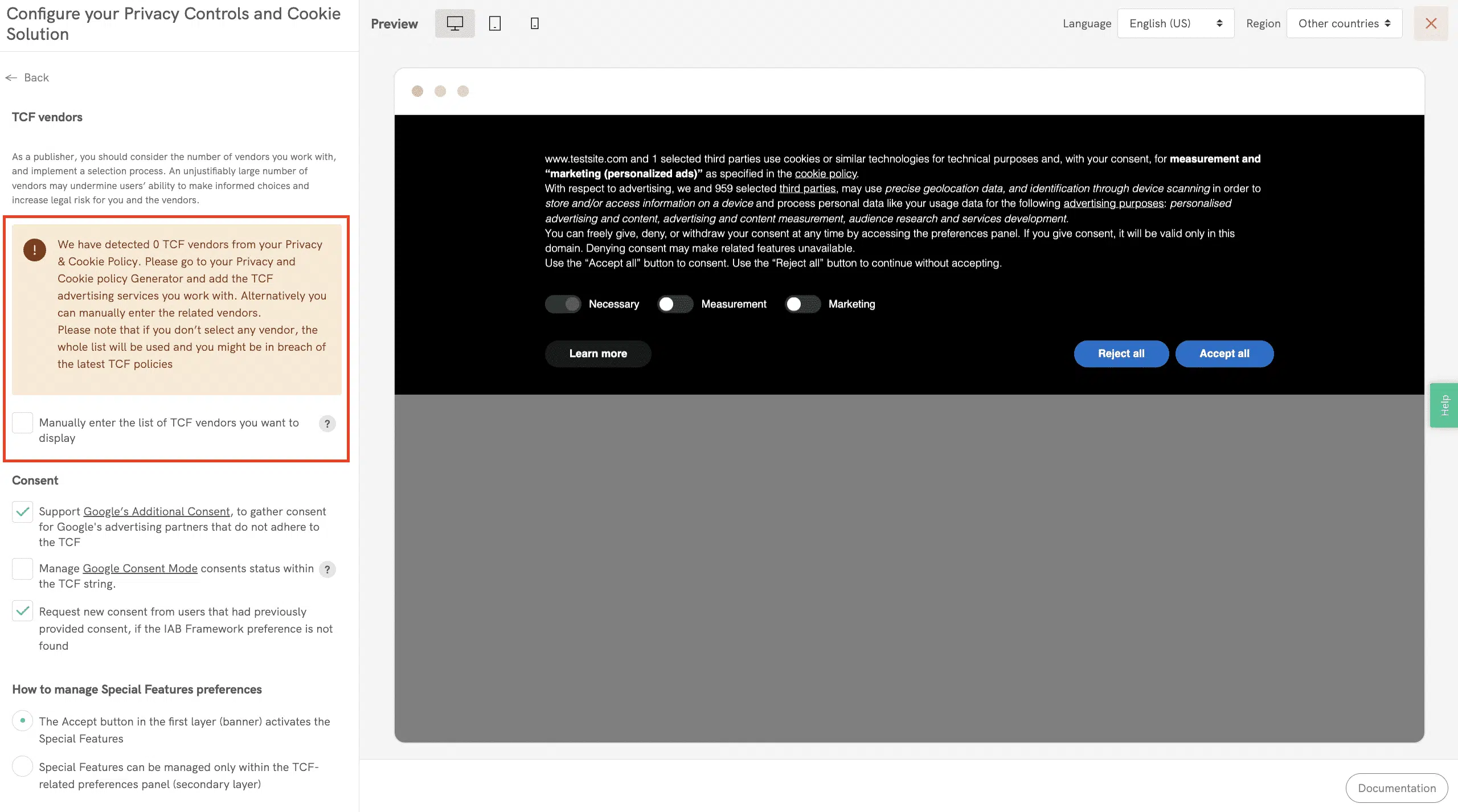
Select your vendors
If you don’t select any vendors, the Privacy Controls and Cookie Solution shows all TCF vendors, which may go against the TCF Policies.
Manage purpose options
You can manage all purpose options, which we keep in line with the latest policy version: updated definitions, no legitimate interest for purposes 3 to 6, and the new purpose 11.
Once you turn on the IAB TCF option, you’ll notice that:
- The banner text gets longer to meet IAB requirements. The extra text (editable only on request) contains the required disclosures for the options described below.
- The “Accept” and “Learn more and customize” buttons are always shown, as IAB requires.
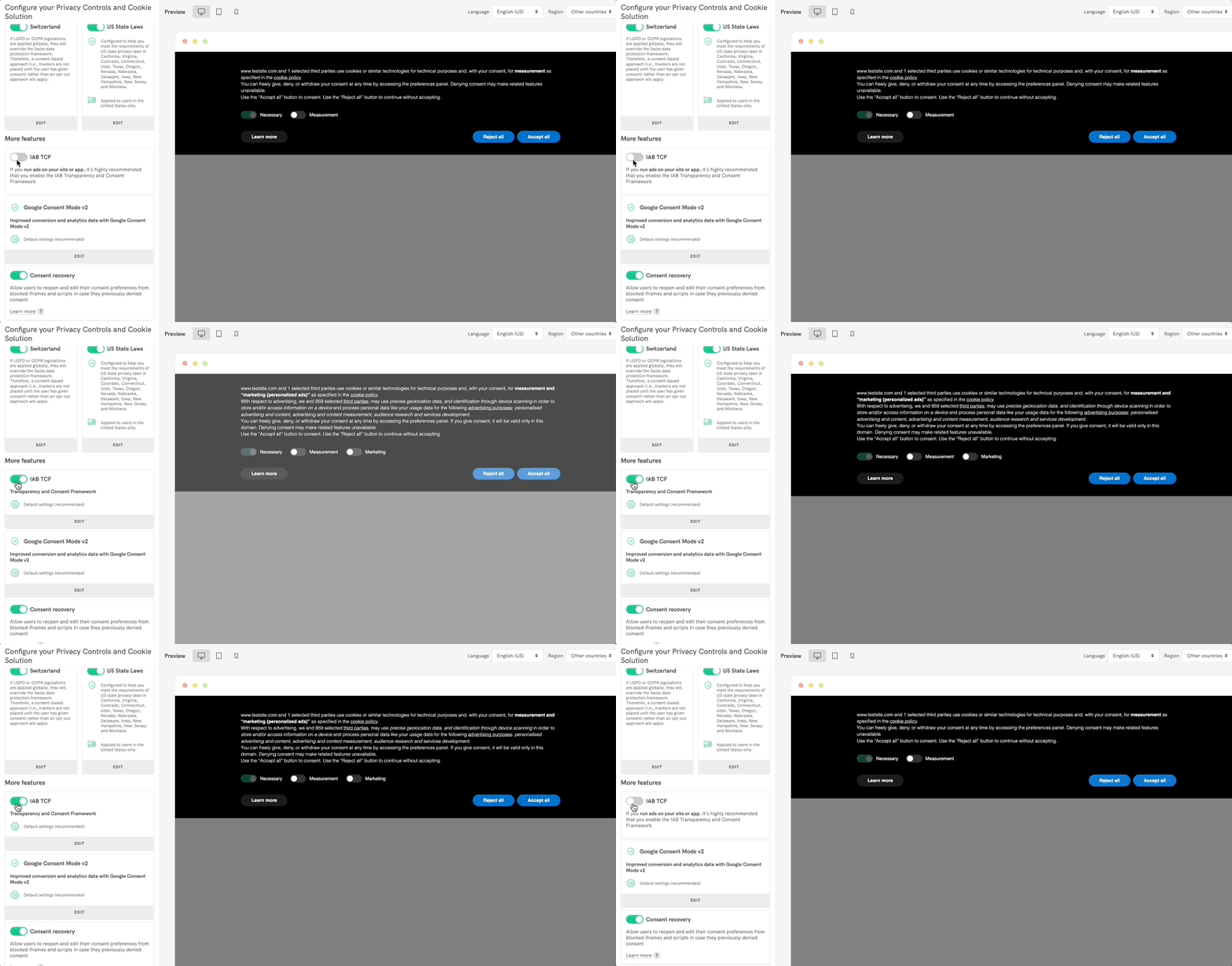
What the banner notice for TCF 2.4 needs to contain
- information about the fact that information is stored on and/or accessed from the user’s device (e.g. use of cookies, device identifiers, or other device data);
- information about the fact that personal data is processed, and the nature of the personal data processed (e.g. unique identifiers, browsing data);
- a link to the list of vendors and the number of third party vendors;
- a list of purposes (using the GVL version 3 standardized names and/or stack names);
- information about the special features used by the vendors (using the GVL standardized names and/or stack names);
- a statement of the scope of the user’s consent: this domain and, if you save consent with user accounts, every device where they’re signed in;
- information about the fact that the user can withdraw their consent at any time, and how to resurface the Framework UI in order to do so;
- a call to action for the user to express their consent
- a call to action for the user to customize their choices
What TCF 2.4 changes in your banner
TCF 2.4 adds two things to your banner. The Features section of the second layer shows standard texts and illustrations from the GVL. If you save consent with user accounts, the banner also says that choices apply across devices.
By default, the banner says: “Your choices apply only to this domain.” If you save consent with your users’ accounts, turn on the multi-device consent notice: in your Privacy Controls and Cookie Solution configuration, go to IAB TCF > Consent and select “Display a multi-device consent notice” (or set multiDeviceConsentNotice: true in code). It’s off by default. Once on, it adds a second sentence to the banner and to the TCF section of the preferences panel: “They’re saved with your account and apply on every device where you’re signed in.”
You can also turn on Google’s Additional Consent Mode, which lets you collect consent for Google ad partners that aren’t part of the Transparency and Consent Framework yet but are on Google’s Ad Tech Providers (ATP) list.
Editing the cookie banner
Enabling the TCF resets any previous changes to the banner text. If you’ve edited the HTML or banner text before, test again with the default text and the buttons enabled.
HTML: if you want to edit the HTML, include our default text with the %{banner_content} shortcode, an element with the class="iubenda-cs-accept-btn" attribute and an element with the class="iubenda-cs-customize-btn" attribute.
Text: with the TCF enabled, you can edit the banner text only on request. To change it, check the IAB requirements and contact us via chat or at info@iubenda.com to have your changes approved.
If you use custom banner text and save consent with user accounts, your text must tell users that their choices apply across devices, as well as on this site.
Privacy Controls and Cookie Solution snippet
Once the TCF is enabled, your Privacy Controls and Cookie Solution embed code changes from this:
<script type="text/javascript">
  var _iub = _iub || [];
  _iub.csConfiguration = {
    "siteId": XXXXXX, // your siteId,
    "cookiePolicyId": YYYYYY, // your cookiePolicyId,
    "lang": "en"
  };
</script>
<script type="text/javascript" src="https://cs.iubenda.com/autoblocking/3095420.js"></script>
<script type="text/javascript" src="///cdn.iubenda.com/cs/iubenda_cs.js" charset="UTF-8" async></script>
To this (note the stub-v2.js script, "enableTcf": true and the other TCF options):
Remote configuration snippet (new):
<script type="text/javascript">
var _iub = _iub || [];
_iub.csConfiguration = {
  "siteId":3156898, //use your siteId
"cookiePolicyId":36614288, //use your cookiePolicyId
 "lang":"en"
};
</script>
<script type="text/javascript" src="//cdn.iubenda.com/cs/tcf/stub-v2.js"></script>
<script type="text/javascript" src="//cdn.iubenda.com/cs/tcf/safe-tcf-v3.js"></script>
<script type="text/javascript" src="//cdn.iubenda.com/cs/beta/iubenda_cs.js" charset="UTF-8" async></script>
Extended snippet (old):
<script type="text/javascript">
var _iub = _iub || [];
_iub.csConfiguration = {
 "askConsentAtCookiePolicyUpdate":true,
 "enableTcf":true, //enable IAB TCF
 "tcfVendors":"628,1111,92", //(OPTIONAL) use this parameter to select manually the vendors you're using

 /*
 (OPTIONAL) Limit the legal basis and choose which TCF purposes to prompt
 "tcfPurposes": {
 "1":"true",
 "2":"consent_only",
 "3":"consent_only",
 "4":"consent_only",
 "5":"consent_only",
 "6":"consent_only",
 "7":"consent_only",
 "8":"consent_only",
 "9":"consent_only",
 "10":"consent_only",
 "11":"consent_only"
 },
 */
 "floatingPreferencesButtonDisplay":"bottom-right",
 "googleAdditionalConsentMode":true,
 "lang":"en",
 "perPurposeConsent":true, //enable per-category consent
 "siteId":3156898, //use your siteId
 "cookiePolicyId":36614288, //use your cookiePolicyId

 "banner":{
 "acceptButtonDisplay":true,
 "closeButtonDisplay":false,
 "customizeButtonDisplay":true,
 "explicitWithdrawal":true,
 "listPurposes":true,
 "position":"float-top-center",
 "rejectButtonDisplay":true
 }
};
</script>
<script type="text/javascript" src="//cdn.iubenda.com/cs/tcf/stub-v2.js"></script>
<script type="text/javascript" src="//cdn.iubenda.com/cs/tcf/safe-tcf-v3.js"></script>
<script type="text/javascript" src="//cdn.iubenda.com/cs/beta/iubenda_cs.js" charset="UTF-8" async></script>
Once you’ve pasted the Privacy Controls and Cookie Solution code inside the body of your pages, the next step is blocking the vendor scripts until consent.
2. Collect consent to ad personalization
The iubenda CMP provides the __tcfapi function so vendors can read the consent correctly. We use a script (safe-tcf-v3.js) whose only job is to read the TCF cookie and release the __tcfapi function, without blocking the vendor scripts directly. It’s a synchronous activator that runs at the very start of the page, so the consent is read within 500ms of the vendor scripts running.
This is the default behavior when you turn on the IAB TCF options in our configurator. It works from the second pageview (once consent is already on the page) and keeps your pages fast.
However, it can cause some incompatibilities with Google Ad Manager, AdSense and AdMob. If you want to block the vendor scripts directly, see below.
More setup options for Google Ads users
Vendors wait a maximum time (generally 500ms, usually not configurable) for consent from the CMP. If the CMP doesn’t respond within 500ms, the vendors’ sell-side platform uses the user’s opt-out status instead, which means your users see non-personalized ads.
This can happen if you use Google’s advertising services, such as Ad Manager, AdSense and AdMob. To prevent it, you can block the vendors’ scripts directly with one of the prior blocking methods our Privacy Controls and Cookie Solution supports, then run them only after consent is collected.
This gives you more direct control over compliance and lets you serve personalized ads from the first pageview, before consent has been collected. It also helps you avoid error 2.1a (for Google Ad Manager, AdSense and AdMob users).
Our Privacy Controls and Cookie Solution offers several tools for blocking scripts that may install cookies until consent is given. Read more in our introduction to the prior blocking of scripts. To block Google’s scripts, see the examples for Google AdSense and Google Publisher Tag.
Per-category consent
If you’ve turned on the Privacy Controls and Cookie Solution’s per-category consent feature, tag TCF scripts as “purpose 1” (Necessary).
Optimization and testing tips
You can also embed stub-v2.js and safe-tcf-v3.js inline or host them yourself if needed. Read this guide for more optimization tips.
To read the consent from the __tcfapi function, open the browser console and run these commands:
window.__tcfapi('getTCData', 2, function(result,success) { console.log(result) });
window.__tcfapi('getTCData', 2, function(result,success) { console.log(result) }, [1,2]);
window.__tcfapi('ping', 2, function(result) { console.log(result) });
Finally, IAB requires you to provide a link or button (for example in the footer) that lets visitors update their advertising tracking preferences after they close the cookie banner. Here’s how.
3. Add a link or button that lets users reopen the consent modal and edit their preferences
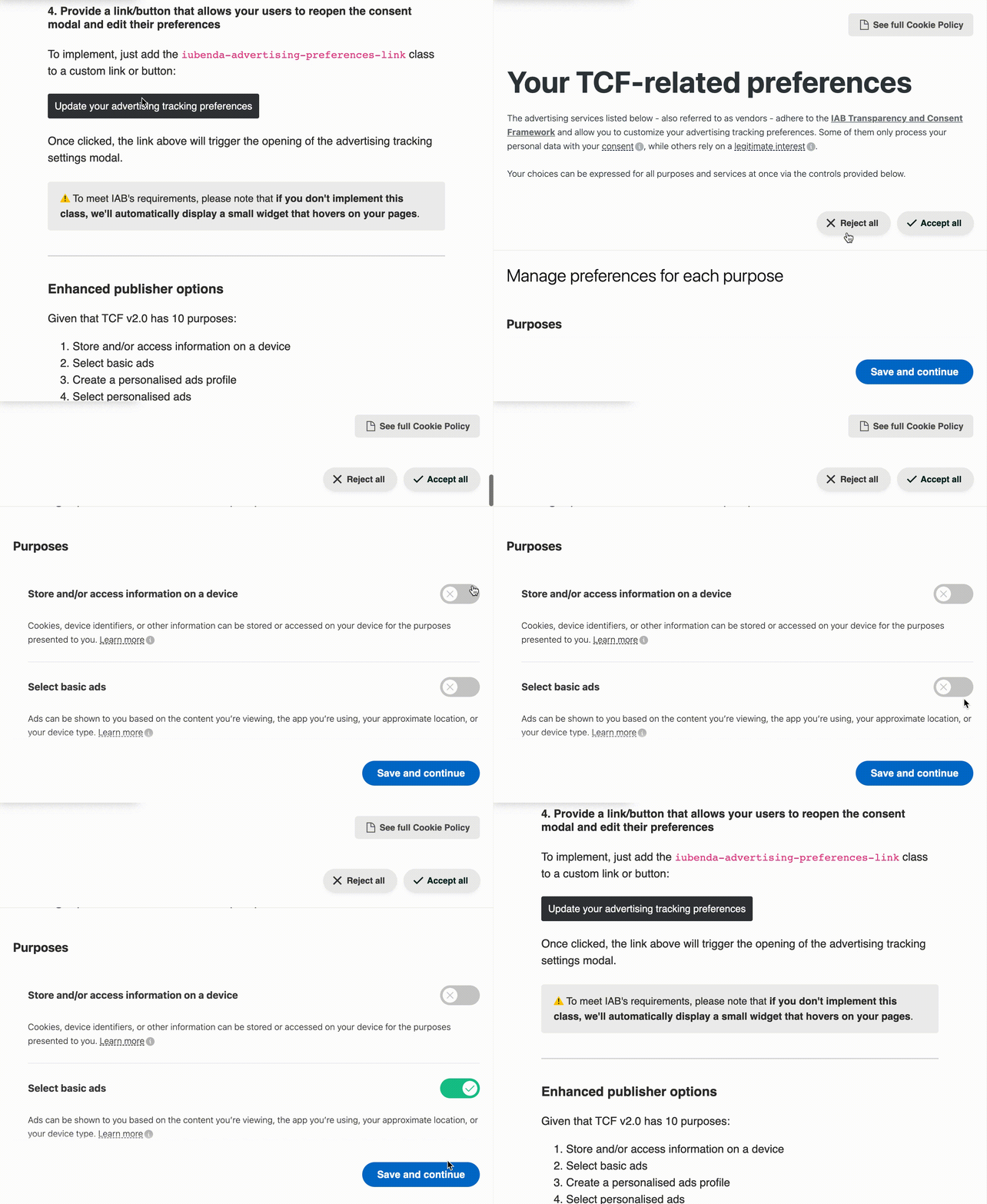
Add the iubenda-advertising-preferences-link class to a custom link or button:
<a href="#" class="iubenda-advertising-preferences-link">
    Update your advertising tracking preferences
</a>
Place it anywhere on your site (usually in the footer). When clicked, it opens the advertising tracking settings modal:
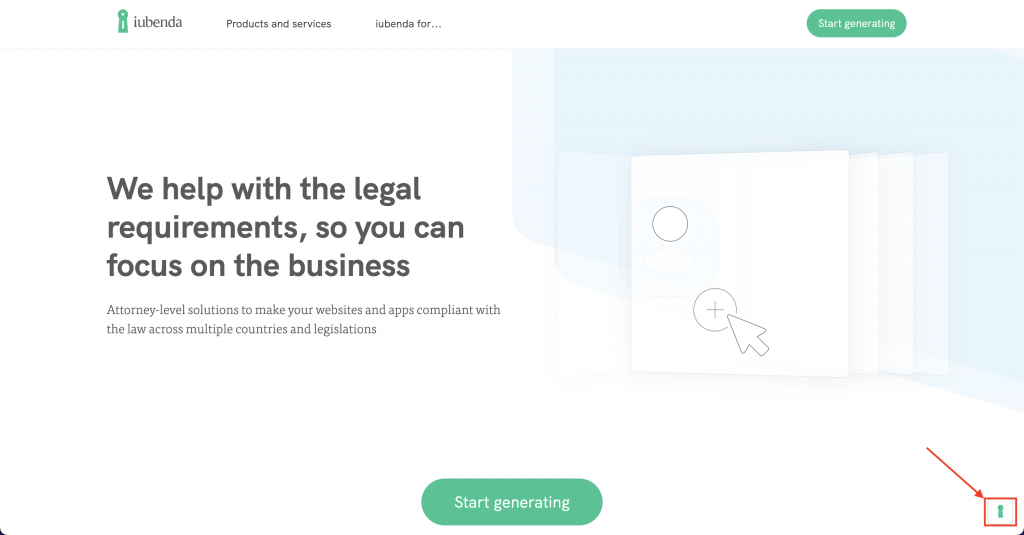
To meet IAB’s requirements, if you don’t use the iubenda-advertising-preferences-link class, we automatically show a small floating widget on your pages:
Additional features and settings
In the IAB TCF tile you’ll find these extra publisher options:
Restrict purposes and legal basis
Scroll to the “Restrictions of purposes and legal basis” option, choose the purposes you want to enable, then select the legal basis for processing personal data for each active purpose.
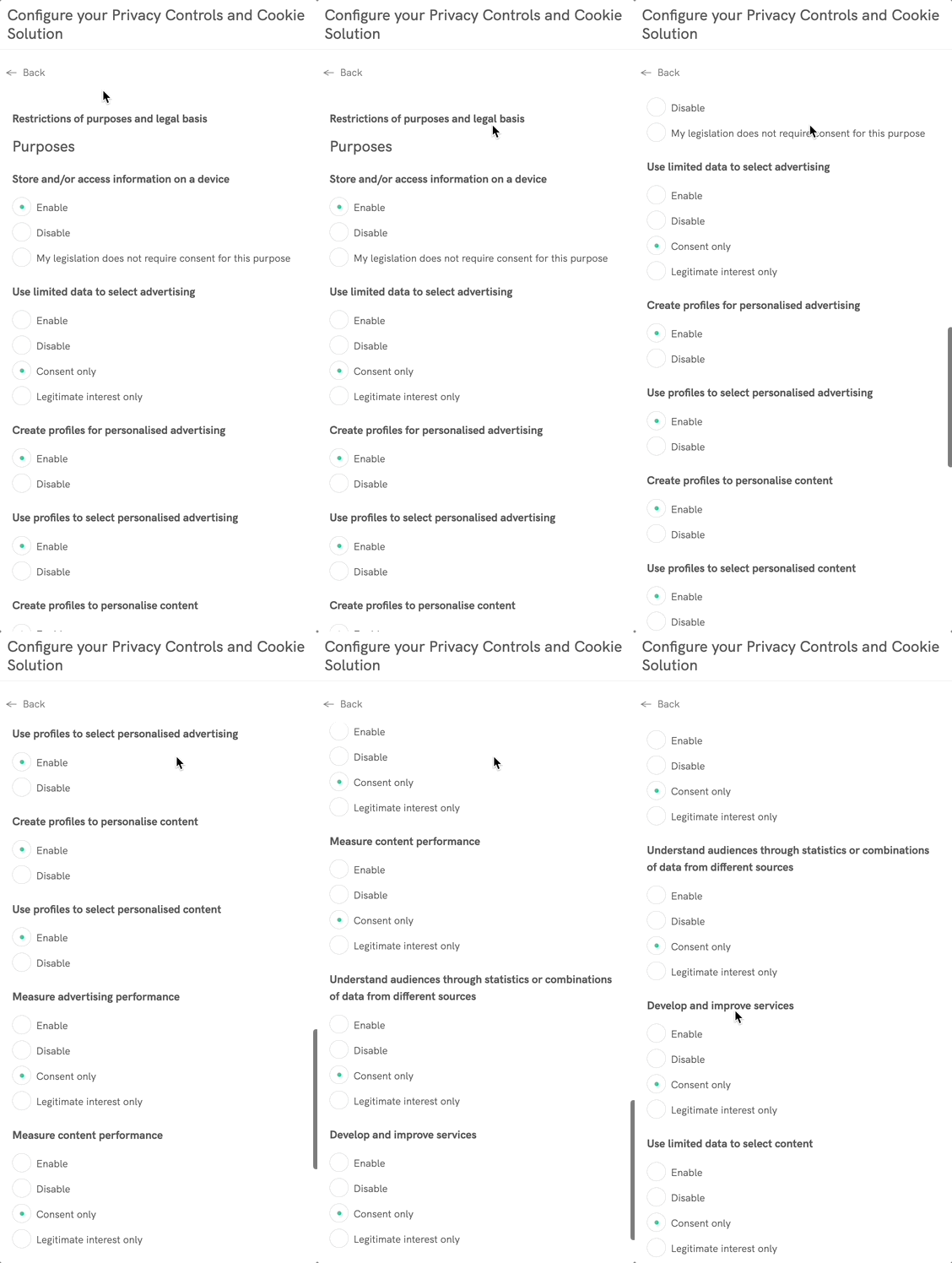
Note: if you’re not sure, “Consent only” is usually the safest option, and best practice for purposes related to profiling.
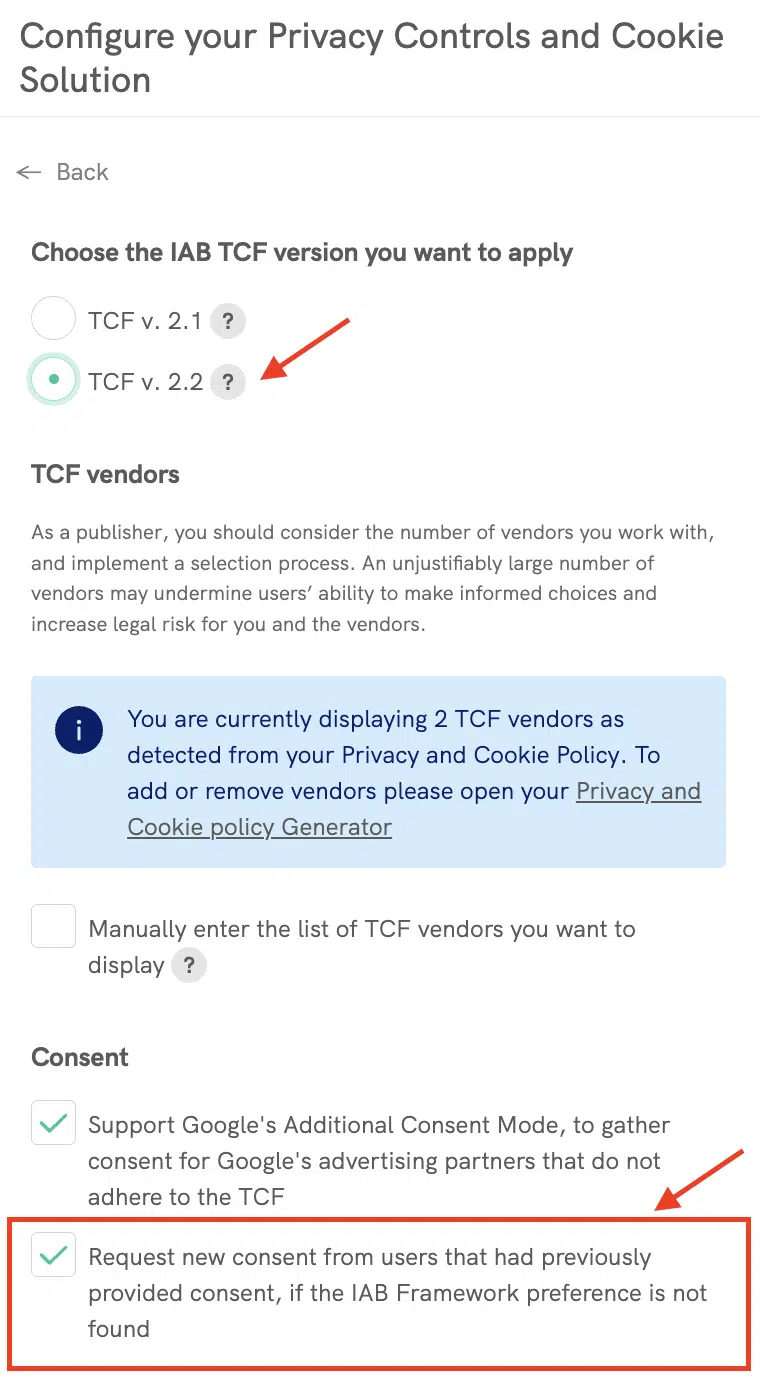
Request new consent from users who gave consent before, if no IAB Framework preference is found
Working with a limited number of vendors has another advantage: it largely avoids having to ask for new consent every time the Global Vendor List changes. The IAB Global Vendor List is updated almost every week.
If you decide not to limit your vendors, you can choose how to handle new consent requests, so you don’t show the banner again to users who gave consent a few days or weeks before.
In the IAB TCF tile, you’ll find a section called Request new consent from users that had previously provided consent, if the IAB Framework preference is not found.
Pass the gdpr and gdpr_consent parameters to the vendor
Some vendors may ask you to pass the gdpr and gdpr_consent parameters in their request. Here’s a snippet for that:
<script type="text/javascript">
    __tcfapi('addEventListener', 2, function(tcData) {
        if (tcData.eventStatus !== 'useractioncomplete' && tcData.eventStatus !== 'tcloaded') {
            return;
        }
        var gdpr = tcData.gdprApplies ? 1 : 0;
        var gdpr_consent = tcData.tcString;
        console.log({ gdpr: gdpr, gdpr_consent: gdpr_consent });
        // Remove event listener to avoid invoking the ads multiple times
        __tcfapi('removeEventListener', 2, function(success) {
            console.log('event listener removed', success);
        }, tcData.listenerId);
    });
</script>
Replace the console.log line with the request to the vendor, using the gdpr and gdpr_consent variables. Then add this snippet below the iubenda_cs.js script, and it will call the vendor script with the correct consent data.
What your users see
When your users click Learn more and customize in your cookie banner to manage their preferences, they see these options:
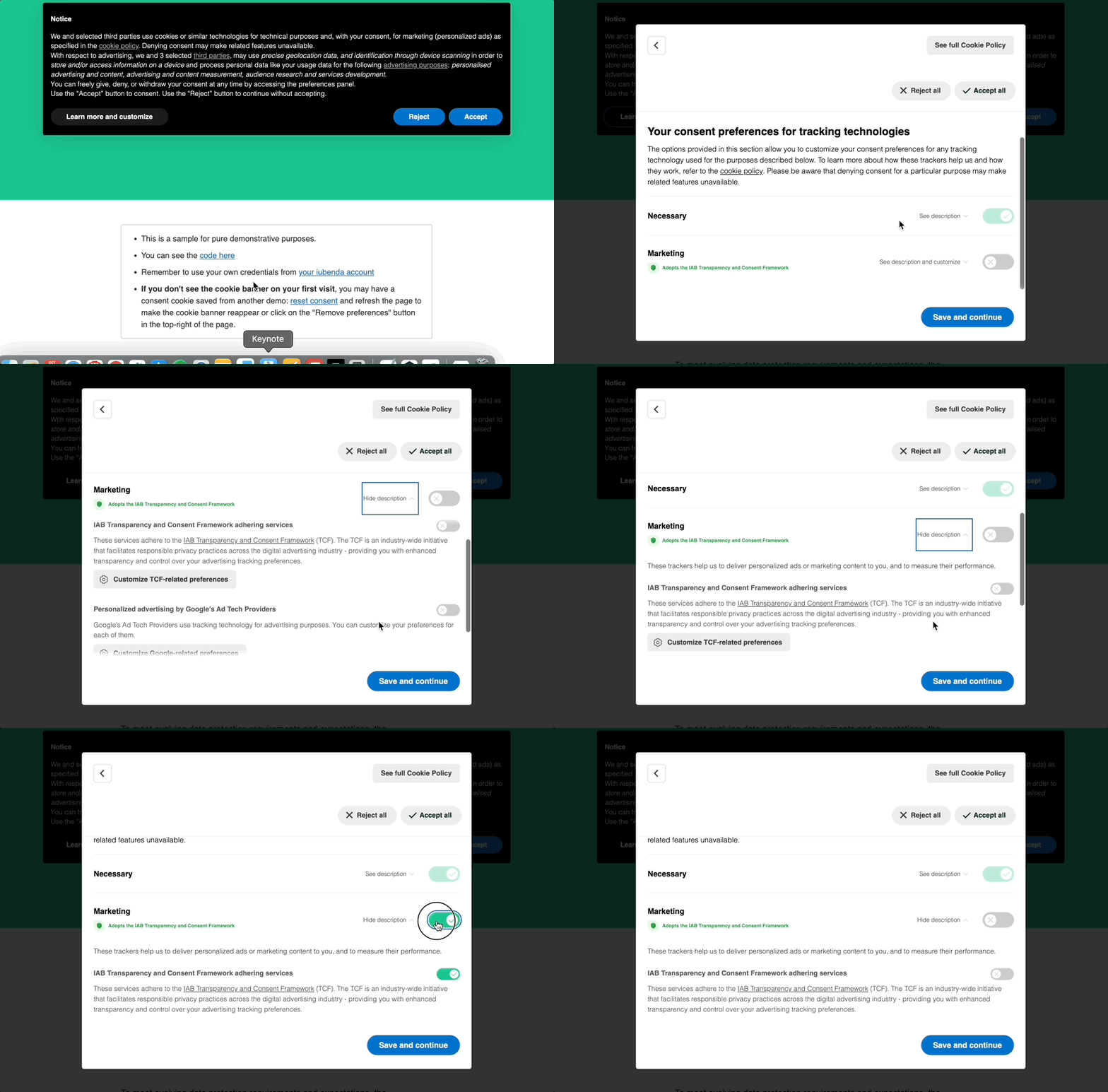
Note: when users open the preferences window, all cookies are off by default, because valid consent legally requires a clear opt-in action.
Frequently asked questions
Do publishers need to resurface the banner to obtain new consent?
In line with IAB’s guidelines, we don’t force anyone to collect consent again, but publishers should assess this case by case. Publishers must limit vendors to those they actually work with and state this clearly in their privacy policy. If they do this and don’t add new vendors, there should be no need to show the banner again or collect consent again, especially as they already restrict legitimate interest. This means changes in legal basis shouldn’t cause issues. Even so, publishers should assess their own situation and decide accordingly.
If I have my own privacy and cookie policy, can I use the iubenda generator only for the TCF services and vendors, and my own policy for the rest?
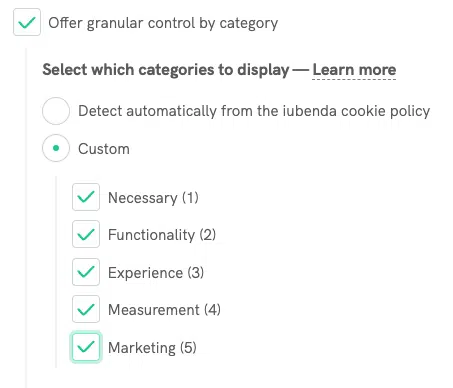
Yes, you can. We recommend one extra step: when an iubenda Privacy and Cookie Policy is detected, the purposes shown in the second layer come from the services you added. To handle all purposes correctly, choose the custom option of granular control by category under GDPR.
Do I need to turn on the multi-device consent notice?
Yes, if you save consent with your users’ accounts, so their choices also apply on every device where they sign in: the banner has to say so. If you don’t, leave it off. Either way the default sentence stays; the notice adds a second one. If you’re not sure, ask whoever built your login or consent integration.
Does TCF 2.4 change the purposes?
No. The purposes stay the same. The changes affect how Features are explained, the name of Special Feature 2 and how Special Purposes vendors signal that they were disclosed.