
What is Google Additional Consent?
Google Additional Consent (AC) is a specification that lets cookie banners signal consent to Google Ad Tech Providers (ATPs): advertising technology companies that work with Google but aren’t registered on the IAB Global Vendor List (GVL).
The IAB Transparency and Consent Framework (TCF) is the industry standard for consent signaling in digital advertising. It maintains the GVL, a list of registered ad tech vendors. When your cookie banner collects consent, it communicates those choices to vendors on that list. Google Additional Consent extends that signaling to cover Google’s ATPs, which operate outside the GVL.
Without Google Additional Consent, consent signals wouldn’t reach those providers at all.
💡 Google Consent Mode vs. Google Additional Consent
Google Additional Consent and Google Consent Mode are two separate frameworks that serve different functions. Google Consent Mode controls how Google’s own tags behave based on user consent choices: when a user declines cookies, those tags switch to a restricted mode that collects only aggregated, cookieless data. Google Additional Consent works at the consent signal level, extending IAB TCF consent strings to cover Google Ad Tech Providers (ATPs) that aren’t registered on the IAB Global Vendor List (GVL). Both can be active on your site at the same time, handling different things in parallel.
Google Additional Consent v1 and v2: what’s the difference?
Google Additional Consent has two versions: v1 and v2. Both signal consent to Google ATPs, but they differ in format and capabilities.
ACv2 updates the format used to signal consent and adds the ability to declare disclosed vendors. It aligns with more recent TCF implementations and Google’s current requirements.
Which version of Google Additional Consent should I use?
Use v2. It’s the current standard and keeps your setup compatible with Google’s advertising ecosystem going forward.
iubenda sets gacVersion to 2 by default. If you haven’t explicitly set a version in your configuration, your setup already uses v2. If you have gacVersion: 1 in your configuration, we recommend switching to 2.
When should I stay on Google Additional Consent v1?
In most cases you won’t need to. But if your setup includes a legacy integration built around the v1 AC string, internal scripts that expect the v1 format, or a complex ad stack where changes need careful testing, you may want to stay on v1 temporarily while you prepare for the switch.
How to configure Google Additional Consent
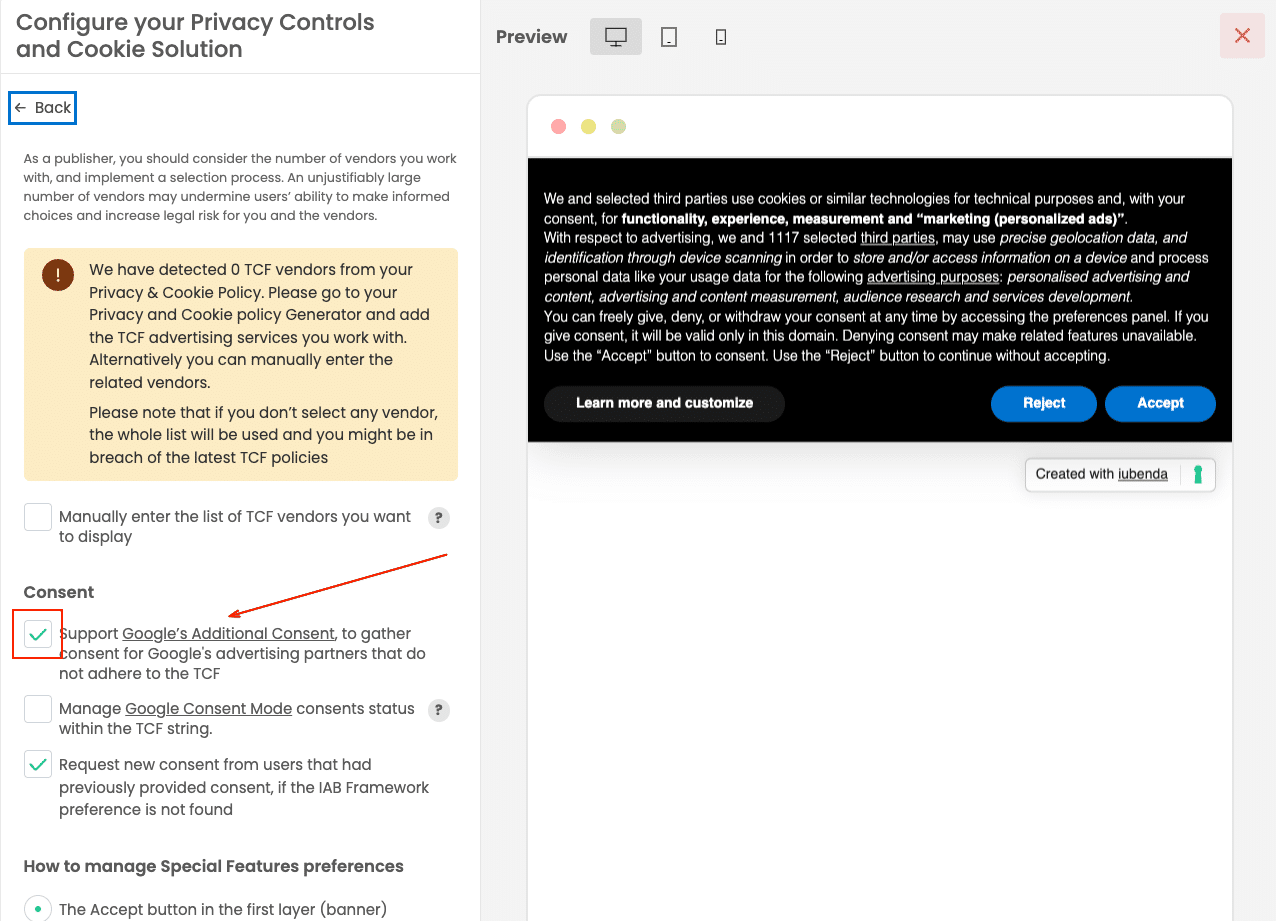
Using the Privacy Controls and Cookie Solution Configurator
Enable Google Additional Consent from the Privacy Controls and Cookie Solution Configurator, under the IAB TCF settings. To configure the version (v1 or v2), use the configuration script below.
Using the configuration script
To configure Google Additional Consent manually, add both googleAdditionalConsentMode and gacVersion to your _iub.csConfiguration object, before the iubenda Privacy Controls and Cookie Solution script.
googleAdditionalConsentMode: true enables Google Additional Consent. gacVersion sets the version (1 or 2).
To enable Google Additional Consent with v2 (recommended):
<script>
window._iub = window._iub || {};
_iub.csConfiguration = {
googleAdditionalConsentMode: true,
gacVersion: 2
};
</script>
To enable Google Additional Consent and keep v1:
<script>
window._iub = window._iub || {};
_iub.csConfiguration = {
googleAdditionalConsentMode: true,
gacVersion: 1
};
</script>
If you’re using the unified embed code, add this block immediately before the main iubenda script tag.
Need help?
Reach out to us via support if you need any further assistance.