

Legacy user? Please refer to this guide to find out how your pageviews are calculated →
To operate properly, the iubenda Privacy Controls and Cookie Solution counts the number of pageviews generated by the website. This is also done to provide the user with useful information regarding the collection of the consent, such as the percentage of consent on the total visits, the manner in which the consent was collected and so on.
The count of the pageviews is carried on by counting the number of executions of the Privacy Controls and Cookie Solution script. Whenever the Privacy Controls and Cookie Solution code runs, our software records a pageview.
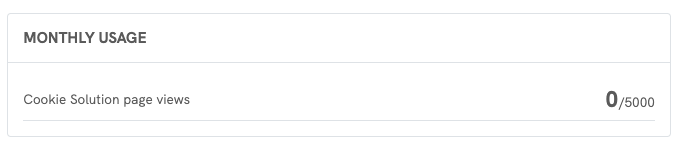
In order to find out the number of generated pageviews:
- head to your dashboard;
- select the site for which you want to check the pageviews;
- click on the gear icon in the top-right corner to access the site settings;
- navigate to “Manage subscription” and scroll to the bottom to check the pageviews.
Why does the amount of pageviews calculated by iubenda not coincide with the pageviews calculated with Google Analytics?
The number of pageviews calculated by our software may differ from those calculated using other statistical software such as Google Analytics, ShinyStat or Matomo/Piwik. One reason is that the Privacy Controls and Cookie Solution leaves out the pageviews generated by bots that identify themselves as bots.
The difference can also run the other way. Analytics platforms apply their own filtering and may exclude traffic that we still count, so your iubenda number can be the higher of the two. If your iubenda pageviews sit far above your analytics numbers, read How to tell whether bot traffic is inflating your pageviews below.
Are the pageviews calculated only at the first visit of each user?
Once the consent has been collected, the banner will disappear and the scripts/cookies that were subjected to the prior consent are immediately released. This is possible because the Privacy Controls and Cookie Solution script continues working behind the scenes, recognizing the users who have already given their consent.
For this reason the pageview is not recorded only at the first visit of each user, but also during all subsequent visits. The Privacy Controls and Cookie Solution script, in fact, runs continuously – even if the banner is not displayed and the blocking of scripts not executed.
How we exclude bots from pageview counting
Many users ask whether bot traffic is counted in their pageviews. We filter out the bots that identify themselves as bots, and that filtering has a real limit worth understanding. Here is how it works.
What happens when a bot visits your site
- The script loads
The Privacy Controls and Cookie Solution script always loads, whether the visitor is a person or a bot. - The system checks the visitor
The script looks at the visitor’s User Agent (the identifier browsers and crawlers use). - The system identifies bots
- If the User Agent contains “bot”, “crawl” or “spider”, or matches our known bot list, the visitor is flagged as a bot.
- If it doesn’t, the visitor is treated as a normal user.
- The system excludes the bot
- The system accepts the preferences automatically and unlocks any blocked scripts.
- The banner is not shown.
- No pageview is recorded.
- Other functions, like event tracking, still work as normal.
This keeps self-declared bots out of your pageview count.
What this filtering cannot catch
Important
We identify bots by reading the User Agent. A crawler that does not declare itself as a bot is counted as a normal visitor, and we cannot filter it out afterwards.
This matters more than it used to. Since late 2025, a large share of AI crawler traffic presents itself as an ordinary browser. It sends a User Agent that looks like Chrome or Safari, so nothing in the request marks it as automated. Our script runs, and the pageview is recorded.
Sites hit by this traffic can see pageviews rise to five or ten times their usual level in a few weeks, with no change in real visitors. If that describes your account, the sections below help you confirm it and act on it.
Which bots we exclude
We exclude:
- Any User Agent with “bot”, “crawl” or “spider” in its name.
- A long list of known crawlers and testing tools, such as:
Bots excluded from pageview counting
- 360Spider
- A6-Indexer
- Aboundex
- AddThis
- ADmantX
- backlinkcrawler
- baiduspider
- bibnum.bnf
- biglotron
- BingPreview
- binlar
- BUbiNG
- CC Metadata Scaper
- changedetection
- ChatGPT-User
- Chrome-Lighthouse
- Claude-User
- coccoc
- Commons-HttpClient
- content crawler spider
- convera
- crawler4j
- curl
- CyberPatrol
- domaincrawler
- drupact
- ec2linkfinder
- europarchive.org
- ezooms
- facebookexternalhit
- FAST Enterprise Crawler
- FAST-WebCrawler
- findlink
- findthatfile
- fluffy
- fr-crawler
- g00g1e.net
- gigablast
- GingerCrawler
- gnam gnam spider
- Google favicon
- Google-Extended
- Google-InspectionTool
- GoogleOther
- GoogleSecurityScanner
- grapeshot
- GrapeshotCrawler
- grub.org
- heritrix
- hotjar
- httpunit
- httrack
- ia_archiver
- ichiro
- integromedb
- IOI
- ip-web-crawler.com
- ips-agent
- it2media-domain-crawler
- java
- lb-spider
- libwww
- linkdex
- lipperhey
- Lipperhey SEO Service
- lssrocketcrawler
- ltx71
- Mediapartners-Google
- MegaIndex
- meta-externalagent
- meta-webindexer
- MicrosoftPreview
- netresearchserver
- nutch
- openindexspider
- page2rss
- panscient
- phpcrawl
- postrank
- proximic
- Python-urllib
- Qwantify
- RetrevoPageAnalyzer
- Sansec Security Monitor
- SimpleCrawler
- sistrix crawler
- siteexplorer.info
- slurp
- sogou
- speedy
- summify
- teoma
- UsineNouvelleCrawler
- Voyager
- webcompanycrawler
- webcrawler
- webmon
- WeSEE:Search
- wget
- wotbox
- y!j-asr
- yahoo
- yandex
- yanga
- yeti
- Bytespider
We also exclude bots from major search engines like GoogleBot, Bing, and DuckDuckGo.
How to tell whether bot traffic is inflating your pageviews
Automated traffic leaves a recognizable pattern in your own analytics. Open your Privacy Controls and Cookie Solution analytics and compare two lines in the pageview summary:
- Total pageviews
- Bounced pageviews, meaning pageviews where the banner appeared and nobody interacted with it
Real audiences produce a steady gap between the two. A crawler never clicks anything, so every visit it makes lands in the bounced figure. When the bounced line climbs until it nearly meets the total line, you are almost certainly looking at automated traffic.
Two checks worth running alongside it:
- Compare the same period against Google Analytics or whichever analytics tool you use. A large gap, where iubenda is much higher, points the same way.
- Look at when the rise started. Bot inflation usually appears as a sharp step rather than the gradual curve real growth produces.
Why robots.txt does not stop these crawlers
A common assumption is that adding a crawler to robots.txt blocks its requests. It does not.
robots.txt is a convention, not a protocol that enforces anything. It publishes a request that well-behaved crawlers choose to respect. The request still reaches your server either way, and a crawler that disguises itself as a browser is already ignoring the convention by design. Our script runs when the page loads, so the pageview is counted whatever your robots.txt says.
It is still worth keeping robots.txt in place for the crawlers that do respect it. Just do not rely on it alone.
What you can do about it
We count a pageview whenever our script runs, so the effective place to act is before the request reaches your page. A request your server refuses never loads the script and never counts.
Work through these in order. Each one catches traffic the previous one misses.
- Update your
robots.txt
List the AI crawlers you do not want, such asGPTBot,Google-Extended,CCBot,PerplexityBot,BytespiderandPetalBot. Takes five minutes, and the well-behaved crawlers will honor it. Treat it as a first step, never as the whole answer. - Block at the server level
Add rules to your.htaccesson Apache, or your nginx configuration, that reject those same crawlers by User Agent before any page is served. This genuinely stops them, whichrobots.txtcannot. Back up the file first, and test your site straight after saving. - Add a firewall or CDN with bot management
This is the step that addresses the disguised traffic. A service such as Cloudflare inspects behavior, request patterns and IP reputation rather than trusting the User Agent, so it catches crawlers that present themselves as ordinary browsers. It also blocks them before they reach your server at all. If you already use Cloudflare, start here. - Consider geo-blocking
If your server logs show the traffic concentrated in regions you do not sell to, blocking those regions at the firewall cuts it off. Check the logs first, and only do this where it does not cost you real visitors.
This does not affect your SEO
These rules target AI crawlers specifically. Googlebot, Bingbot and the other search engine crawlers keep indexing your site normally.
Two things worth knowing as you work through the list:
- Blocking a crawler does not always change your pageview number. Many AI crawlers already identify themselves, and we already leave those out of your count. Blocking them still saves bandwidth and server load, but your pageview figure will not move. The traffic that drives a large spike is the disguised kind, which is why step 3 matters most.
- Review your rules every few months. Crawlers change their User Agent periodically, so a list that worked last quarter can go stale.
All of this works going forward. None of it removes pageviews already recorded, because once a request has been counted as a visitor there is no signal left that would let us separate it from real traffic.
If a spike has already affected your account
Get in touch
A spike can push you past your plan limit, which may upgrade your plan automatically, generate an extra charge, or stop your banner from serving. If any of that has happened, get in touch with our support team.
Send us the dates of the spike and, where you have it, an export from your own analytics covering the same period. That comparison is what lets us review your case.