
Conformément aux principes généraux de la législation en matière de protection de la vie privée, qui interdisent tout traitement de données préalable au consentement, la Loi cookies interdit l’installation de cookies avant l’obtention du consentement de l’utilisateur, sauf pour les cookies qui relèvent de catégories exemptées. En pratique, cela signifie que les scripts qui récupèrent des bannières publicitaires, et même ceux qui gèrent un service de chat en direct ou un bouton de réaction sur Facebook, ne peuvent pas s’exécuter tant que l’utilisateur n’a pas donné son consentement.
The iubenda Privacy Controls and Cookie Solution includes all the necessary tools to facilitate compliance with the cookie law.
Cookies exemptés
Certains cookies bénéficient de l’exemption de consentement préalable, ce qui signifie que vous n’avez pas besoin de leur appliquer les mesures de conformité décrites dans ce guide. Il s’agit notamment des :
- Technical cookies, i.e. those needed to provide the service. These include preference cookies, session cookies, load balancing cookies etc.
- Statistical cookies, directly managed by you, such as through software like Matomo/Piwik. This exemption does not apply if these statistical cookies are used for profiling.
- Statistical third-party cookies, in cases where the data is anonymized before being recorded by the third party service and if the third party is obligated to not cross-check the information gathered with other data in its possession.
Note
Some details regarding this may differ slightly from one EU Member State to another. This guide takes a comprehensive look at requirements, however, we still suggest that you inform yourself of the privacy authority guidelines applicable to you.
How to block cookies prior to consent with the iubenda Privacy Controls and Cookie Solution
Our cookie management solution offers various tools for the prior blocking of codes that may install cookies.
Automatic Blocking (auto-blocking)
With this feature, our Privacy Controls and Cookie Solution takes care of automatically blocking third-party scripts that install cookies and trackers, saving you time and effort, so you don’t have to do it manually.
iubenda automatically blocks selected sources from setting cookies on the user’s browser based on the results from the site scanner with consideration to the cookie classifications listed in the Cookie Policy, as well as commonly used scripts and tracking technologies.
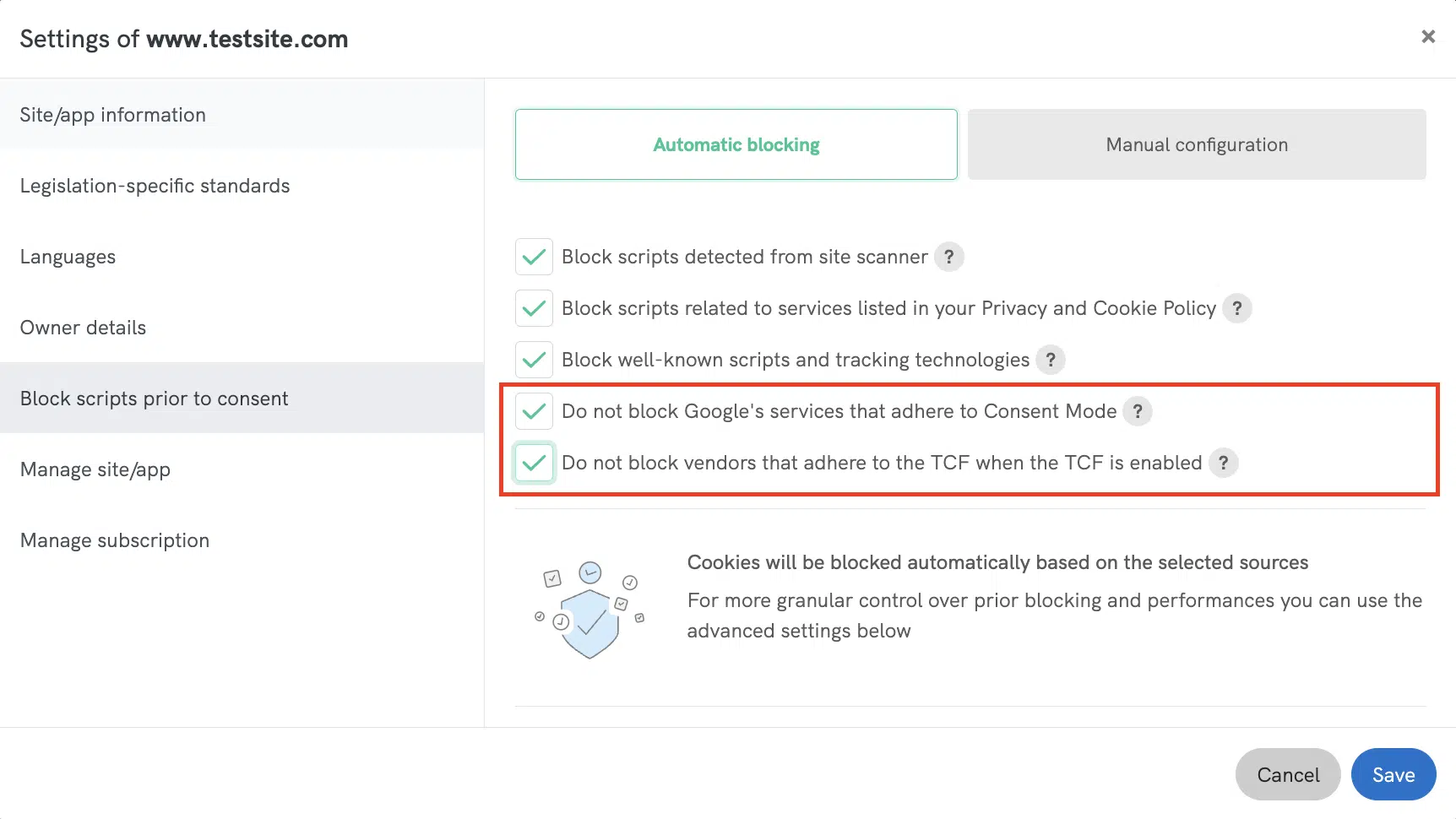
On the site info section “Block scripts prior to consent” under « Automatic blocking » you can find these two checkboxes (enabled by default):
✅ Do not block vendors that adhere to the TCF when the TCF is enabled:
When TCF is enabled, ad delivery is driven by the TCF consent string reflecting user choices. We suggest not blocking these vendors with automatic blocking to ensure optimal site performance and uninterrupted ad display.
✅ Do not block Google’s services that adhere to Consent Mode:
When this option is enabled, our Privacy Controls and Cookie Solution will automatically set the default consent state for Google services, allowing you to manage them directly through ‘Consent Mode‘ without any further action.
Customize Service Categorization
To improve flexibility in auto-blocking behavior within the Privacy Controls and Cookie Solution (Cookie Banner), the Privacy and Cookie Policy Generator now allows you to customize service categorization in your Privacy and Cookie Policy. This means you can reassign service categories, affecting which consent is required for unblocking. For example, a service under Marketing (5) stays blocked until marketing cookies are accepted, but if moved to Experience (3), it will require only experience consent.
➡️ See Customize Service Categorization for more details.
👉 For more information on auto-blocking, read our dedicated guide Prior Blocking of Cookies: Automatic Blocking (auto-blocking)
Modules
Our Privacy Controls and Cookie Solution plugins for WordPress, Magento, Joomla! and PrestaShop allow you to automate the blocking of scripts drastically reducing the necessity for direct interventions in the site’s code.
Ces modules simplifient le blocage des scripts de plusieurs façons :
- Auto-block list. By default, the plugin detects and blocks the most popular server-side scripts (you can find the full list in the dedicated plugin guides listed below).
- Custom field with the plugin console. You can block scripts that are directly inserted into the page via javascript by simply identifying the scripts you need to block within the plugin’s custom fields.
- Manual wrapping method. You can also directly modify your site’s code and wrap the scripts that you need to block in the plugin’s block tags.
- Shortcodes. There are shortcodes available for elements installed directly within WordPress posts (as opposed to elements integrated at the template level – example footer.php). Currently, the shortcodes are only available for the WordPress plugin.
Une fois installé et configuré, le module reconnaît automatiquement les scripts et les bloque jusqu’à l’obtention du consentement.
Pour des informations plus précises relatives à la plateforme qui vous intéresse, choisissez le guide qui lui est consacré dans la liste ci-dessous :
Si vous utilisez Drupal, consultez la section ci-dessous consacrée au blocage préalable via la classe PHP.
Google Tag Manager
Cette méthode présente l’avantage d’être assez rapide, mais ne fonctionne pas avec les scripts qui définissent la position d’un élément. Google Tag Manager ne fonctionne donc pas pour les scripts qui affichent un élément précis à un endroit donné sur la page (comme le bouton de réaction sur Facebook).
For more information read the How to Use Google Tag Manager to Simplify the Blocking of Cookies guide.
Google Adsense et Ad Manager
Google Adsense est différent, car vous pouvez le bloquer via Google Ad Manager (qui s’appelait auparavant DFP, soit DoubleClick for Publishers). Dans ce cas, la méthode repose également sur une forme de balisage manuel (comme celle que nous allons voir plus bas), avec en plus l’utilisation de Google Ad Manager.
The method in question is therefore only valid for Google Adsense, the complete guide is available here.
IAB Consent Management Provider Framework
With this feature enabled, the Privacy Controls and Cookie Solution automatically blocks the scripts of advertisers that are a part of the IAB Vendor List (provided that the individual advertisers adhere to the standards of the network), prior to receiving user consent.
This means that you can avoid having to manually set-up the prior blocking mechanism for the particular third parties that are a part of the IAB Vendor List.
If you’re running other scripts related to third-parties that are not included on the IAB Vendor List, you’ll still need to set up prior blocking for those scripts using another method.
Caution
Please consider that using this method means that you do not directly block the vendor scripts yourself, therefore, the success of this method depends heavily on the individual vendors’ adherence to regulation. For more hands-on control, please use one of the other methods described in this guide. You can find more information about blocking vendor scripts with the TCF here.
For more general information on the IAB Transparency & Consent Framework and how to enable it, read the dedicated guide.
Balisage manuel
Cette méthode vous demande d’identifier les scripts soumis à l’obligation de consentement préalable. Une fois ces scripts identifiés, vous devez les modifier manuellement pour permettre à notre solution de les reconnaître, les bloquer et les débloquer en fonction des choix de l’utilisateur.
Manual tagging is explained in detail in this guide. The guide explains the processes for manual blocking, together with many practical examples (i.e. how to set up the blocks for a Facebook Like Button, Google Analytics, Adsense and so on).
Classe PHP
Vous pouvez aussi utiliser la classe PHP de iubenda pour analyser et remplacer les scripts qui génèrent des cookies. Nos modules WordPress et Joomla! reposent justement sur cette classe. Vous pouvez l’utiliser pour créer votre propre module de façon indépendante pour une plateforme pour laquelle nous n’avons pas encore développé de solution spécifique.
If you’d like to use the same logic of our WordPress or Joomla! plugin on other systems, you can refer to the guide for our PHP class.
* Vous pouvez accéder à la classe par téléchargement direct ou via Packagist. Vous trouverez des instructions complètes dans le guide de la classe PHP dont le lien figure ci-dessus.
Mode consentement de Google
Pour aider les annonceurs à gérer les cookies à des fins d’analyse et de publicité, Google propose désormais le Mode consentement, une fonctionnalité qui vous permet d’éviter le blocage préalable pour Google Analytics et Google Ads (y compris le Remarketing et le Suivi des conversions de Google Ads).
Learn how to implement it with our Privacy Controls and Cookie Solution.