
De acordo com os princípios gerais da lei de privacidade, que não permitem o processamento de dados antes do consentimento, a lei dos cookies não permite a instalação de cookies antes de obter o consentimento do usuário, salvo nas categorias isentas de consentimento. Na prática, isso significa que scripts que reiteram banners, ou mesmo scripts que geram chats ao vivo ou o botão Curtir do Facebook, não podem ser executados antes da obtenção do consentimento do usuário.
The iubenda Privacy Controls and Cookie Solution includes all the necessary tools to facilitate compliance with the cookie law.
Cookies isentos de consentimento
Alguns cookies estão isentos de consentimento prévio e, portanto, não exigem o cumprimento das recomendações contidas neste manual. Sobretudo:
- Technical cookies, i.e. those needed to provide the service. These include preference cookies, session cookies, load balancing cookies etc.
- Statistical cookies, directly managed by you, such as through software like Matomo/Piwik. This exemption does not apply if these statistical cookies are used for profiling.
- Statistical third-party cookies, in cases where the data is anonymized before being recorded by the third party service and if the third party is obligated to not cross-check the information gathered with other data in its possession.
Note
Some details regarding this may differ slightly from one EU Member State to another. This guide takes a comprehensive look at requirements, however, we still suggest that you inform yourself of the privacy authority guidelines applicable to you.
How to block cookies prior to consent with the iubenda Privacy Controls and Cookie Solution
Our cookie management solution offers various tools for the prior blocking of codes that may install cookies.
Automatic Blocking (auto-blocking)
With this feature, our Privacy Controls and Cookie Solution takes care of automatically blocking third-party scripts that install cookies and trackers, saving you time and effort, so you don’t have to do it manually.
iubenda automatically blocks selected sources from setting cookies on the user’s browser based on the results from the site scanner with consideration to the cookie classifications listed in the Cookie Policy, as well as commonly used scripts and tracking technologies.
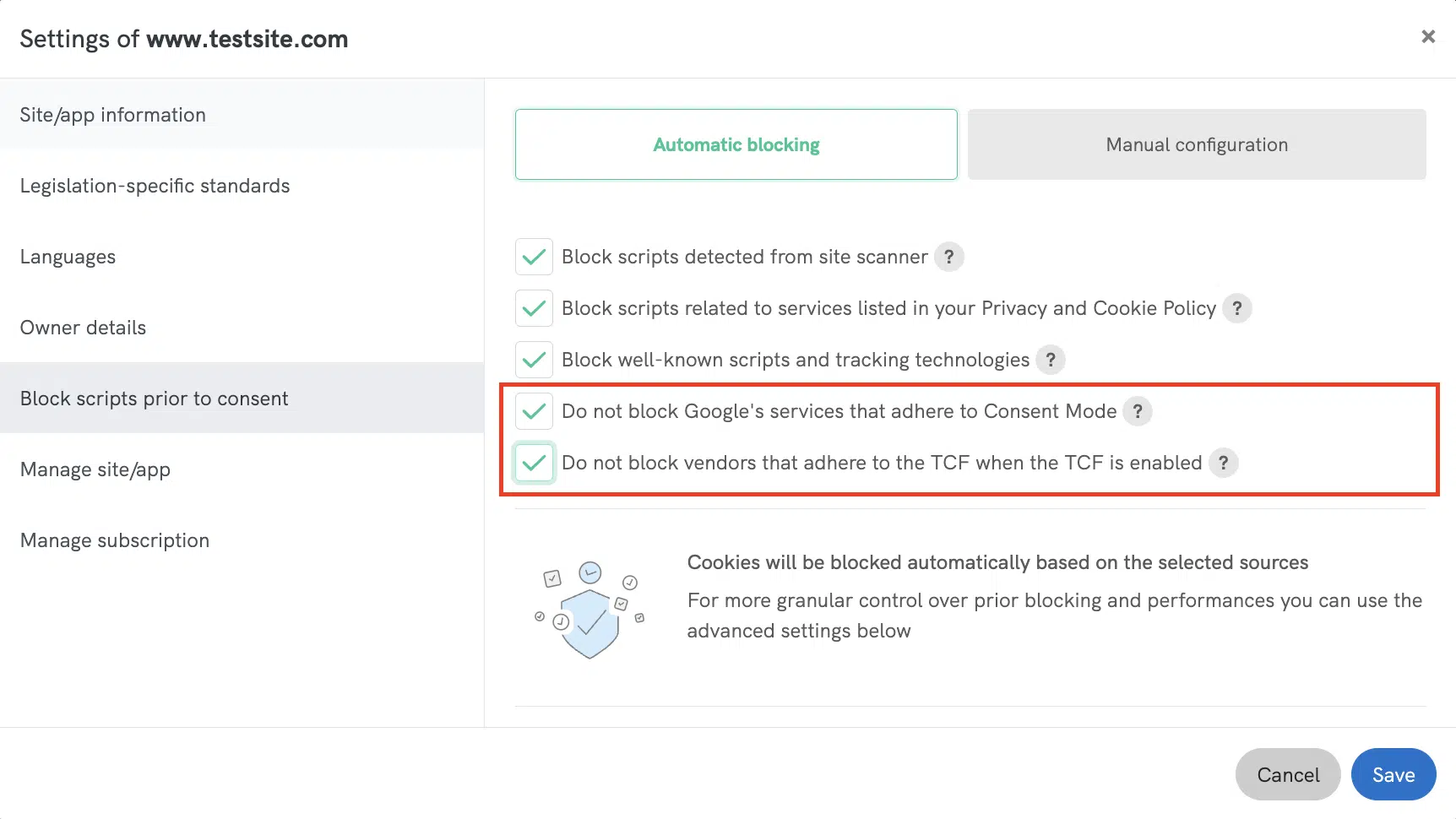
On the site info section “Block scripts prior to consent” under “Automatic blocking” you can find these two checkboxes (enabled by default):
✅ Do not block vendors that adhere to the TCF when the TCF is enabled:
When TCF is enabled, ad delivery is driven by the TCF consent string reflecting user choices. We suggest not blocking these vendors with automatic blocking to ensure optimal site performance and uninterrupted ad display.
✅ Do not block Google’s services that adhere to Consent Mode:
When this option is enabled, our Privacy Controls and Cookie Solution will automatically set the default consent state for Google services, allowing you to manage them directly through ‘Consent Mode‘ without any further action.
Customize Service Categorization
To improve flexibility in auto-blocking behavior within the Privacy Controls and Cookie Solution (Cookie Banner), the Privacy and Cookie Policy Generator now allows you to customize service categorization in your Privacy and Cookie Policy. This means you can reassign service categories, affecting which consent is required for unblocking. For example, a service under Marketing (5) stays blocked until marketing cookies are accepted, but if moved to Experience (3), it will require only experience consent.
➡️ See Customize Service Categorization for more details.
👉 For more information on auto-blocking, read our dedicated guide Prior Blocking of Cookies: Automatic Blocking (auto-blocking)
Plugins
Our Privacy Controls and Cookie Solution plugins for WordPress, Magento, Joomla! and PrestaShop allow you to automate the blocking of scripts drastically reducing the necessity for direct interventions in the site’s code.
O plugin simplifica o bloqueio de scripts de diversas maneiras:
- Auto-block list. By default, the plugin detects and blocks the most popular server-side scripts (you can find the full list in the dedicated plugin guides listed below).
- Custom field with the plugin console. You can block scripts that are directly inserted into the page via javascript by simply identifying the scripts you need to block within the plugin’s custom fields.
- Manual wrapping method. You can also directly modify your site’s code and wrap the scripts that you need to block in the plugin’s block tags.
- Shortcodes. There are shortcodes available for elements installed directly within WordPress posts (as opposed to elements integrated at the template level – example footer.php). Currently, the shortcodes are only available for the WordPress plugin.
Depois de instalado e configurado, o plugin reconhece e bloqueia os scripts de forma automática, antes do consentimento.
Para obter detalhes específicos da plataforma, escolha um dos manuais listados abaixo:
Usuários do Drupal, vejam abaixo a seção sobre bloqueio prévio por meio da classe PHP.
Google Tag Manager
Este método tem a vantagem de ser bastante rápido, mas com a limitação de funcionar apenas para scripts que não requeiram uma posição específica. O Google Tag Manager, portanto, não é eficaz para todos os scripts que exibem um elemento específico em uma posição específica da página (como o botão Curtir do Facebook).
For more information read the How to Use Google Tag Manager to Simplify the Blocking of Cookies guide.
Google Adsense e Ad Manager
O Google Adsense é diferente porque pode ser bloqueado por meio do Google Ad Manager (antigo DFP – DoubleClick for Publishers). Nesse caso, ele também é uma espécie de codificação manual – como a descrita abaixo – mas com a diferença do uso do Google Ad Manager.
The method in question is therefore only valid for Google Adsense, the complete guide is available here.
IAB Consent Management Provider Framework
With this feature enabled, the Privacy Controls and Cookie Solution automatically blocks the scripts of advertisers that are a part of the IAB Vendor List (provided that the individual advertisers adhere to the standards of the network), prior to receiving user consent.
This means that you can avoid having to manually set-up the prior blocking mechanism for the particular third parties that are a part of the IAB Vendor List.
If you’re running other scripts related to third-parties that are not included on the IAB Vendor List, you’ll still need to set up prior blocking for those scripts using another method.
Caution
Please consider that using this method means that you do not directly block the vendor scripts yourself, therefore, the success of this method depends heavily on the individual vendors’ adherence to regulation. For more hands-on control, please use one of the other methods described in this guide. You can find more information about blocking vendor scripts with the TCF here.
For more general information on the IAB Transparency & Consent Framework and how to enable it, read the dedicated guide.
Codificação manual
Este método requer que você identifique os scripts que estão sujeitos à exigência de consentimento prévio. Feito isso, os scripts devem ser modificados manualmente para que possam ser reconhecidos, interrompidos e liberados pelo nosso software, dependendo da escolha do usuário.
Manual tagging is explained in detail in this guide. The guide explains the processes for manual blocking, together with many practical examples (i.e. how to set up the blocks for a Facebook Like Button, Google Analytics, Adsense and so on).
Classe PHP
Você também pode usar a classe PHP da iubenda para analisar/substituir scripts que geram cookies. Esta é a classe na qual nossos plugins do WordPress e Joomla! estão baseados, e você pode usá-la para construir seu próprio plugin de forma independente para uma plataforma diferente daquelas para as quais já desenvolvemos uma solução específica.
If you’d like to use the same logic of our WordPress or Joomla! plugin on other systems, you can refer to the guide for our PHP class.
*Você pode acessar a classe por download direto ou Packagist, e encontrar instruções completas no manual da classe PHP no link acima..
Modo de Consentimento do Google
Para ajudar os anunciantes a gerenciar cookies com finalidades estatísticas e de publicidade, o Google introduziu o Modo de Consentimento, um recurso que permite evitar o bloqueio prévio do Google Analytics e do Google Ads (incluindo o Google Ads Conversion Tracking and Remarketing).
Learn how to implement it with our Privacy Controls and Cookie Solution.