

If you run Google Tag Manager, you’ve probably heard the advice: move your tags to a server you control. Server-side tracking with Google Tag Manager is the most common way to do it.
The reason is signal loss. Ad blockers and browser restrictions stop some tracking requests before they reach your analytics or ad platforms, so your reports undercount what your campaigns do, or aren’t accurate. For the full picture, start with our guide to server-side tracking. This guide covers the Google Tag Manager side.
In short
- Server-side Google Tag Manager (sGTM) adds a second container that runs on a tagging server instead of in the visitor’s browser.
- The browser sends one stream of events to the tagging server, and the server container decides what to send to each tool you use: Google Analytics and Google Ads, but also platforms like Meta.
- The container is free to configure, but the server isn’t: if you host it yourself on Cloud Run, Google’s figures put a production setup at roughly $90 a month.
- Consent still applies. Moving tags to the server doesn’t change the rules for collecting data.
In this guide:
- What is server-side Google Tag Manager (sGTM)?
- What is the difference between server-side and client-side GTM?
- How Google Tag Manager server-side tracking works
- Benefits of server-side GTM
- Drawbacks to weigh first
- How much does server-side GTM cost?
- How to set up Google Tag Manager server-side tracking
- How consent works in server-side GTM
- Server-side GTM vs Google tag gateway
- Where to start
- FAQ: server-side Google Tag Manager
What is server-side Google Tag Manager (sGTM)?
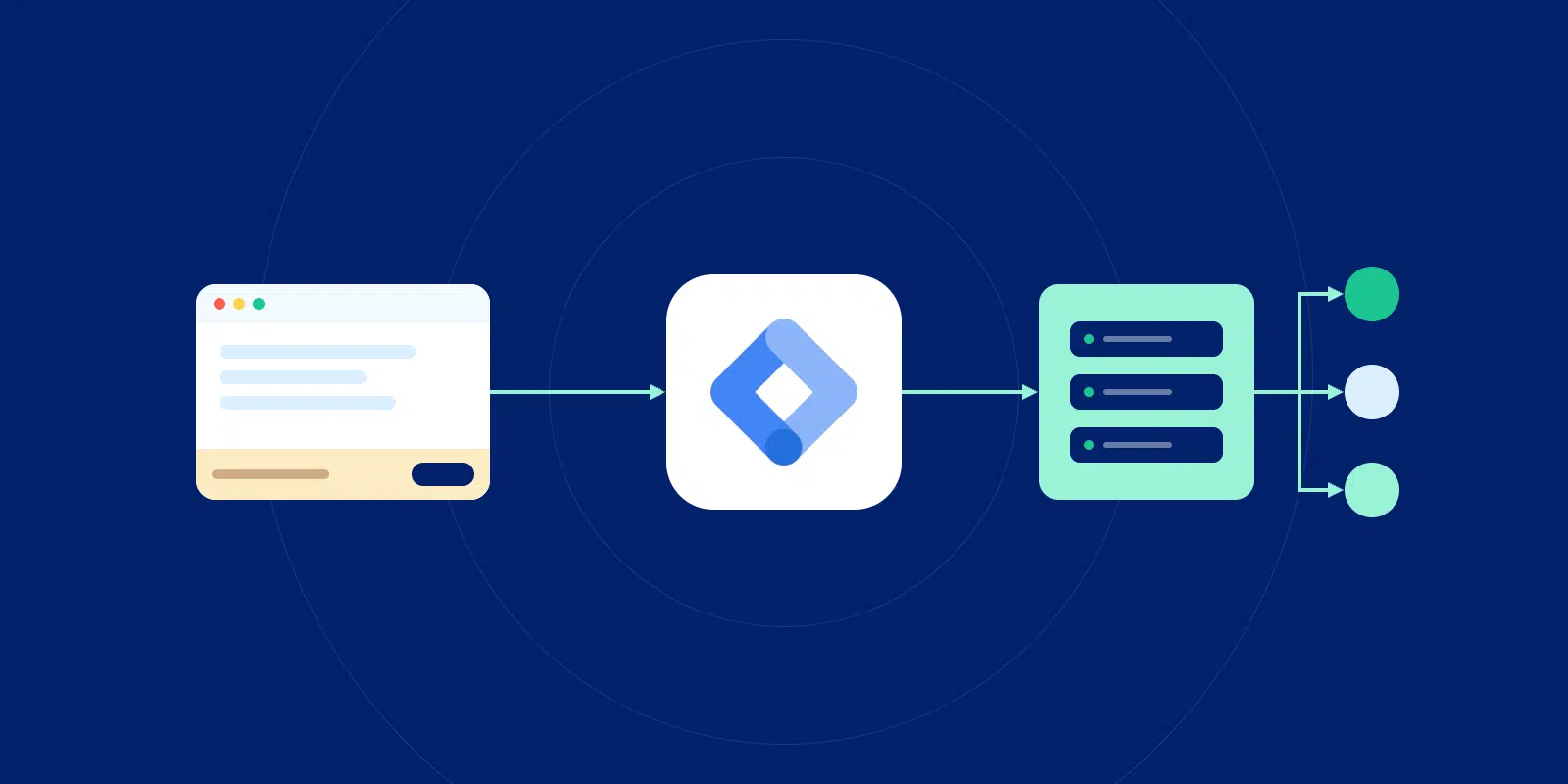
Server-side Google Tag Manager (sGTM) is a Google Tag Manager container that runs on a tagging server instead of in the visitor’s browser. The browser sends event data to that server, and the server container decides what to forward to each vendor, such as Google Analytics 4 (GA4), Google Ads, or Meta.
In Google’s words, a server container “doesn’t run in the user’s browser or on their phone”. Setting up the container in Google Tag Manager is free. Running the server it lives on is not, which is where most of the planning goes.
What is Google Tag Manager?
Google Tag Manager is Google’s free tool for managing the tracking tags on your site, the small pieces of code that send data to tools like Google Analytics or Meta. You install one container and control every tag from a single dashboard.
What is the difference between server-side and client-side GTM?
Client-side GTM runs every tag in the visitor’s browser, while server-side GTM moves most of that work to a tagging server that sits between your site and your vendors.
| What changes | Client-side GTM (web container) | Server-side GTM (server container) |
|---|---|---|
| Where tags run | In the visitor’s browser | On a tagging server |
| What the browser downloads | A script for each vendor | One Google tag sending one data stream |
| Who receives the request first | Each vendor, directly | The tagging server, on your subdomain |
| Who sees raw data before vendors | Each vendor sees what its tag collects | You do, and you decide what to pass on |
| Cookie domain | Often vendor domains | Your own domain |
| Cost | Free | Free container, paid hosting |
| How consent applies | Banner choices control tags in the browser | Banner choices travel with each event to the server |
Most setups run both containers. The web container stays on your site and sends events to the server container, which then handles delivery. If you want a refresher on the browser side, here’s how website tracking works.
How Google Tag Manager server-side tracking works
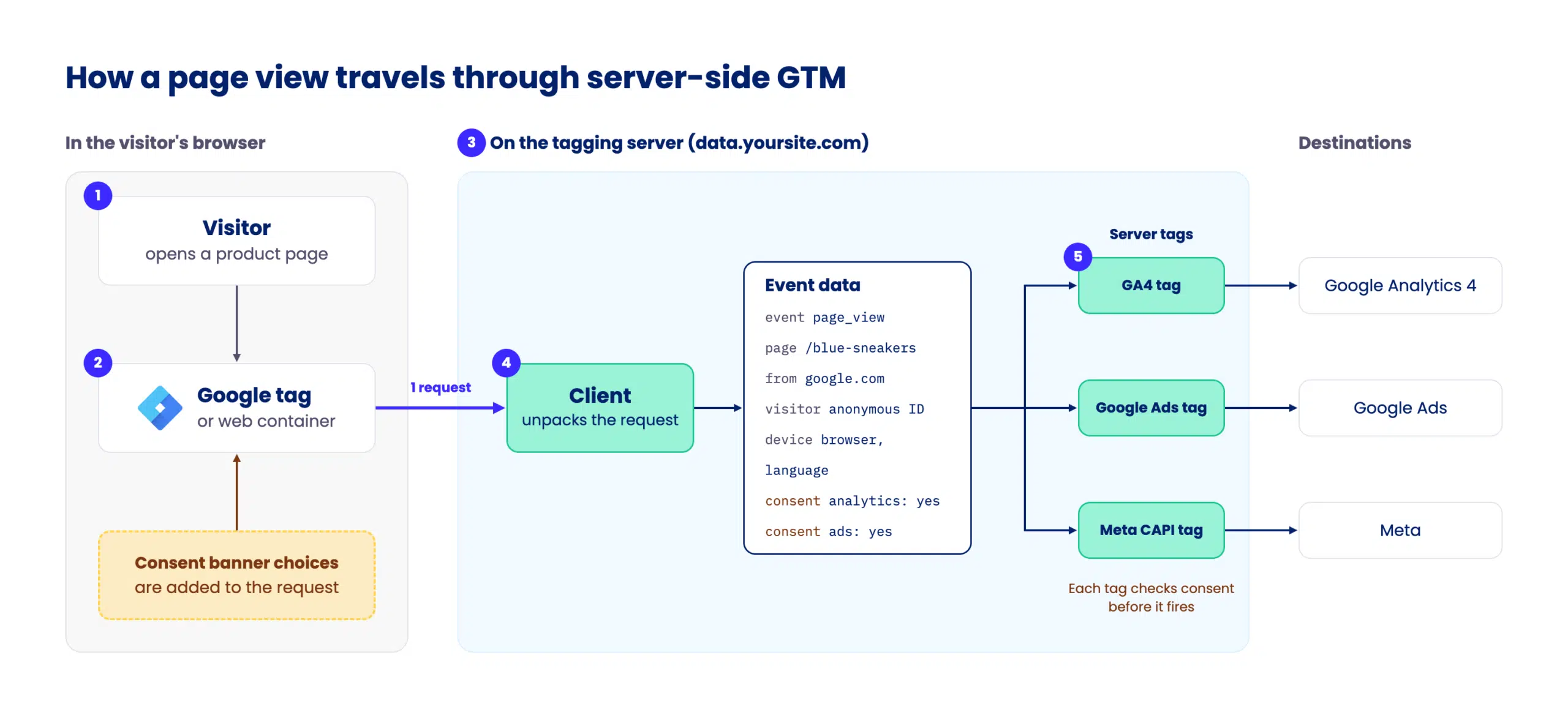
Here’s what happens when a visitor acts on a site running sGTM:
- The visitor acts. They view a page, add to cart, or buy.
- The browser sends one request. The Google tag (or your web container) sends the event to the tagging server instead of to each vendor.
- The tagging server receives it. It sits on a subdomain of your site, such as
data.yoursite.com. - A client turns the request into event data. The client recognizes the incoming request and unpacks it into a standard event. For a page view, that’s the event name (
page_view), the page URL and title, where the visitor came from, a random ID for the visitor’s browser, and their consent choices. - Server tags forward the event. Triggers decide which tags fire, and each tag sends the data to its destination: GA4, Google Ads, Meta, and others.
The server container: clients, tags and triggers
If you know the web container, you know most of the server container. Google confirms that tags, triggers and variables “work exactly like they do in other kinds of containers”.
The new piece is the client. A client is an adapter: it receives the incoming request, turns it into one or more events, and passes them into the container. Server containers come with a GA4 client built in, so GA4 requests work without extra setup.
Benefits of server-side GTM
- Lighter pages. Fewer vendor scripts load in the browser, which can help page speed.
- Control over what vendors receive. You can remove or redact fields before data leaves the tagging server, so each vendor gets only what it needs.
- Fewer lost requests. Blockers and browser restrictions are less likely to stop requests to your own subdomain than requests to known vendor domains. The effect varies with your setup, so measure it rather than assume it.
- API keys stay off your site. Keys for services like Meta’s Conversions API live in the server container, so visitors can’t see them in your site’s code.
The goal is better data you can use with consent. The consent section below explains why server-side GTM can’t override a visitor’s choices.
Drawbacks to weigh first
- Hosting cost. You pay for the tagging server every month, whatever your traffic.
- Setup and maintenance. Someone has to configure DNS, monitor the server and keep tags current.
- Gaps in vendor support. Not every tool you use has a server-side tag yet.
- Harder debugging. Problems can sit in either container, or in the link between them.
- Consent still applies. Server-side tagging doesn’t remove consent requirements.
In our view, it’s worth the effort for sites with meaningful ad spend or visible gaps in analytics. A small site with a few tags may not see enough benefit to justify the cost.
How much does server-side GTM cost?
The container itself is free. What you pay for is the server it runs on, plus the time to set it up and maintain it.
Google’s own numbers give a useful baseline. For a Cloud Run setup (Google’s service for running software on its servers without managing those servers yourself), Google estimates “each server costs approximately $45 /month (USD)” and recommends “a minimum of 2 instances to reduce the risk of data loss in case of a server outage” (Google for Developers, updated 12 May 2026). That puts a production setup at roughly $90 a month before traffic grows. Google expects 2 to 10 autoscaling servers to handle 35 to 350 requests per second, depending on your tags.
How to set up Google Tag Manager server-side tracking
A server-side GTM implementation follows the same seven steps, whichever hosting route you pick. Google’s guides cover each one in detail, so here’s the overview.
- Create a server container. In Google Tag Manager, create a new container and choose “Server” as the target platform.
- Choose where the tagging server runs. Google offers automatic provisioning on Cloud Run straight from the Tag Manager interface, or a manual setup in Google Cloud or elsewhere. Managed providers can also run the server for you. iubenda’s Server-Side Tracking takes a simpler route: it sends your tags through your own subdomain and checks consent before forwarding any data, with no server container to configure.
- Map a custom subdomain. Point a subdomain like
data.yoursite.comat the tagging server so requests stay first-party, meaning the browser sees them as part of your own site rather than a third-party tracker. - Point your Google tag at the tagging server. Update the Google tag or web container so events go to your subdomain instead of straight to Google.
- Add clients and server tags. Set up a tag for each destination. GA4 and Google Ads tags are built in, and other platforms offer templates in the Tag Manager gallery, such as Meta’s official Conversions API tag. For tools without a template, a developer can build a custom tag.
- Test in preview and debug mode. The server container has its own preview mode, so you can watch each incoming request and check which tags fire.
- Publish and monitor. Compare event volumes against your client-side numbers for a few weeks before you switch anything off.
Set up consent before step 5. Every server tag you add should respect the visitor’s consent choices from day one. Here’s how that works.
How consent works in server-side GTM
Moving tags to the server changes where data travels, but the rules for collecting it stay the same.
Consent signals travel with the event
Your consent banner collects each visitor’s choices and passes them to the Google tag. The Google tag then adds them to every request it sends to the server container. Google confirms that “you only need to set up consent mode in the web container”, and that Google product tags in the server “are consent-aware” and adjust what they send. If you haven’t set it up yet, start with Google Consent Mode.
Non-Google tags need their own consent checks
That consent-aware behavior covers Google’s own tags. Tags for other vendors in the server container only respect consent if whoever manages the container configures them to, usually by making each trigger check the consent state that your consent management platform passes along with the event.
Regulations also look at what happens on the visitor’s device. Under the EU ePrivacy Directive, reading or storing information on a device generally requires consent, whatever happens to the data next. A tagging server doesn’t change that, which is why the cookie consent requirements still apply to your setup.
For the full legal picture, see: Is server-side tracking GDPR compliant?
Your consent checklist for sGTM:
- A consent banner collects choices before any tag fires.
- You’ve configured Consent Mode in the web container.
- The consent state reaches the server container with each event.
- Every non-Google server tag checks consent before it fires.
- You keep a record of consent you can show if asked.
Server-side GTM vs Google tag gateway
Google tag gateway for advertisers lets you load Google’s tag scripts from your own domain, through your existing content delivery network (CDN), load balancer, or web server. It’s the lighter option, and people often confuse the two.
| What you’re comparing | Google tag gateway | Server-side GTM |
|---|---|---|
| What it does | Serves Google’s scripts from your domain | Receives events and decides what each vendor gets |
| Where it runs | Your CDN, load balancer, or web server | A tagging server |
| Setup effort | Low, with guided setup for some CDNs | Moderate to high |
| Cost | No tagging server to run | Monthly hosting for the tagging server |
| Control over data sent to vendors | None: data goes to Google as usual | Full: you can change or remove fields |
| Works with non-Google vendors | No | Yes, with server tags |
Google recommends combining the two “for the most durable tagging setup”. In practice, tag gateway suits advertisers who mainly want Google’s tags served first party with little setup. Server-side GTM suits teams who also want to control what every vendor receives.
Where to start
Server-side GTM improves how your data reaches vendors, and consent decides which of that data you can use. Plan both together, and you’ll end up with a setup that holds up when someone asks where the numbers came from.
Make sure to get the consent part right, because everything downstream depends on it. Your consent management platform is where the consent state begins: it collects each visitor’s choices and makes them available to every tag, in the browser and on the server. iubenda’s Privacy Controls & Cookie Solution supports Google Consent Mode, so the choices visitors make on your banner travel with every event your tagging server receives.
If running a tagging server yourself sounds like more than your team wants to take on, a managed solution can host and maintain it for you.
Server-side tracking with compliance built-in
Instead of a server-side GTM container you run and maintain, we route events through a first-party gateway, so there’s nothing new to host.
FAQ: server-side Google Tag Manager
Can I use server-side tagging in Google Tag Manager?
Yes, you can use server-side tagging in Google Tag Manager by creating a server container alongside your web container. It runs on a tagging server hosted on Google Cloud or by a managed provider, and your web container sends events to it instead of to each vendor.
Can I send Meta Conversions API events through server-side GTM?
Yes, you can send Meta Conversions API events through server-side GTM. Meta maintains an official Conversions API tag for server containers in the Tag Manager template gallery. It forwards events from the tagging server to Meta, and it should only fire when the visitor has consented.
Does server-side GTM work with GA4?
Yes, server-side GTM works with GA4 out of the box. Server containers include a built-in GA4 client that receives GA4 requests from the browser, plus a GA4 tag that forwards events to Google Analytics. Most teams start with GA4.
Do I still need the web container with server-side GTM?
In most setups, yes, you still need the web container with server-side GTM. The web container or Google tag collects events in the browser and sends them to the tagging server, which handles delivery to vendors. Sending events straight from a backend is the exception.
Does server-side GTM get around ad blockers?
Server-side GTM doesn’t reliably get around ad blockers, though blockers often stop fewer requests because they go to your own subdomain. Some blockers now recognize first-party tracking subdomains, and Safari limits cookies in some setups. A visitor’s consent choices still apply either way.
Is server-side tracking legal?
Server-side tracking is a way of delivering data, and regulations don’t ban it. They focus on collection: under the General Data Protection Regulation (GDPR) and the EU ePrivacy Directive, collecting data from a visitor’s device generally requires consent, whether it goes to vendors directly or through a tagging server.
Can I use server-side GTM for mobile apps?
Yes, you can use server-side GTM for mobile apps. Google documents a setup for mobile apps where the app sends measurement data to a server container, which forwards it to your vendors as it would for a website.