

In short
Google Consent Mode connects your cookie banner to your Google tags. When a visitor accepts or rejects cookies, Consent Mode passes that choice to Google Ads, Google Analytics, and other Google services, and they adjust what they collect. When visitors say no, Google fills part of the measurement gap with modeling instead of tracking.
This guide covers what Google Consent Mode is, how it works, what changed with v2, and how to set it up and check it on your site.
In this article:
Google Consent Mode v2: what’s new and how it affects you
Everything in this guide, in one downloadable e-book.
What is Google Consent Mode?
Google Consent Mode is a feature from Google that adjusts how Google tags behave based on each user’s consent choice. It helps advertisers meet the consent requirements of rules like the General Data Protection Regulation (GDPR) and the EU ePrivacy Directive, while keeping the measurement and personalization features of Google Ads and Google Analytics through statistical modeling.
In other words, it lets you respect users’ choices about ads and analytics trackers and still get a representative view of how users convert on your site, using AI modeling for lost conversions.
Google launched the original Consent Mode in September 2020. Advertisers who added consent banners had seen a significant drop in reported conversions, which hurt Smart Bidding and return on ad spend. In November 2023, Google added two new signals. That version, known as Consent Mode v2, is the standard today.
What is a CMP?
A Consent Management Platform (CMP) is software that manages user consent on a website or app through a consent banner. It collects, stores, and manages users’ consent preferences for activities like analytics, advertising, and retargeting, and blocks cookie scripts until users give consent. Here’s how to choose a consent management platform.
How does Google Consent Mode work?
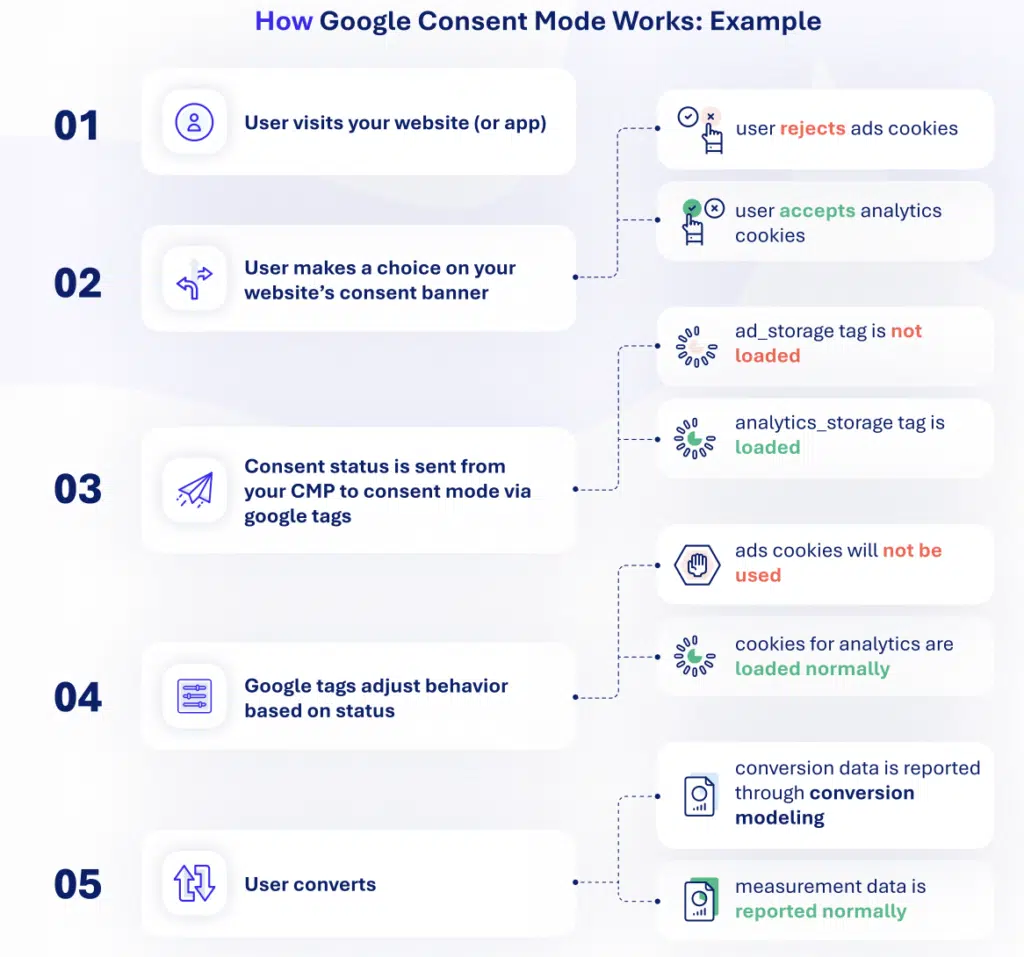
Google Consent Mode works with Google Ads, Google Analytics, AdSense, Ad Manager, AdMob, Floodlight, and Conversion Linker. Here’s the process:
- A user visits your website and accepts or rejects trackers on your CMP’s consent banner.
- Your CMP passes that choice to your Google tags through Consent Mode, using four consent signals (more on those below).
- Google tags adjust their behavior. When a user consents, trackers load normally. When there’s no consent, Google applies conversion modeling to recover lost conversions instead.
- Modeled conversions appear in your campaign reports, with the same granular detail as observed conversions.
- In Google Ads, this data feeds Google’s bidding tools, so you optimize your campaigns on a fuller view of your results.
How Google models conversions without consent
Conversion modeling uses Google AI to analyze observable data and historical trends, including signals like device type, conversion type, country, time of day, and browser. Using journeys where users have consented, Google’s models estimate the attribution paths for journeys that are missing consent. Conversion modeling doesn’t use identifying information. It uses probability to connect ad interactions with conversion events like sales.
Google Analytics 4
Google Analytics 4 does something similar with behavioral modeling. It estimates the behavior of users who decline analytics cookies from similar users who accept them. It needs enough data first: at least 1,000 daily events from users who deny analytics_storage for 7 days, and 1,000 daily users who grant it on at least 7 of the previous 28 days (Google Analytics Help).
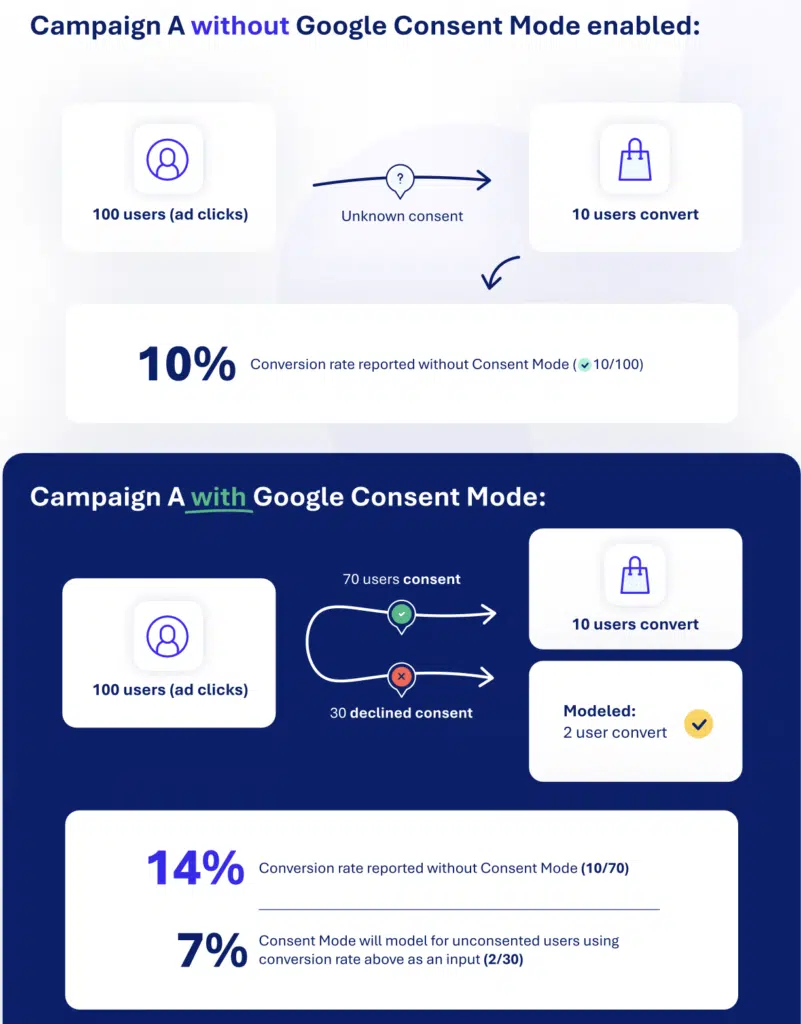
Here’s what modeling adds, in an illustrative example. A campaign gets 100 ad clicks and 10 conversions. Without Consent Mode, it reports a 10% conversion rate. With Consent Mode, 70 users consent and all 10 conversions come from them, a 14% observed rate. Consent Mode then models 2 more conversions among the 30 users who declined:
The four consent signals in Consent Mode v2
Consent Mode v2 works with four signals, each set to “granted” or “denied.” The first two date from the original version. Version 2 added the other two.
| Signal | What it controls | Relates to |
|---|---|---|
ad_storage | Whether cookies for ads purposes can be read and written | Data collection |
analytics_storage | Whether cookies for analytics purposes can be read and written | Data collection |
ad_user_data (v2) | Whether user data can be sent to Google for advertising purposes | How data is used or shared |
ad_personalization (v2) | Whether personalized advertising, like remarketing, can be turned on | How data is used or shared |
Google defines three more consent types (functionality_storage, personalization_storage, and security_storage). They don’t change how Google Ads or Google Analytics behave, but CMPs and Google Tag Manager can use them for other tags (Google for Developers).
Basic vs. advanced consent mode
Google Consent Mode v2 comes in two implementation modes. If a user denies consent, the relevant tags either adjust their behavior (advanced mode) or stay entirely blocked (basic mode).
| Basic mode | Advanced mode | |
|---|---|---|
| Before the user chooses | Google tags don’t load. Nothing is sent to Google | Google tags load, with consent set to “denied” by default |
| Consent granted | Tags load and work as normal | Tags work as normal |
| Consent denied | Tags stay blocked. No information is collected for analytics or ads | Tags don’t use cookies and send cookieless pings instead. No user data is sent for ads, and personalized ads stay off |
| Conversion modeling | General model | Advertiser-specific model, more detailed |
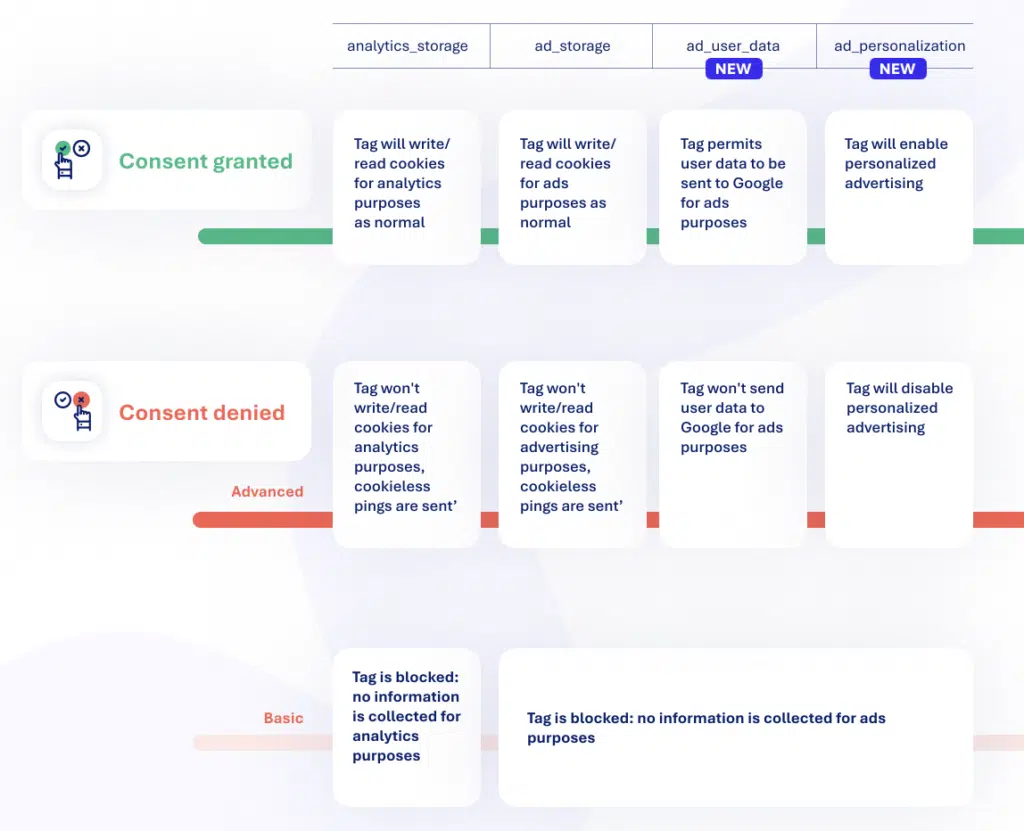
Advanced mode gets you the most out of Consent Mode v2, since it gives you better insight into performance even when users deny consent. With basic mode, Google doesn’t report your total unconsented conversions or how consent choices affect your conversion rate.
That said, cookieless pings still send some information to Google, so some teams choose basic mode. Weigh the measurement benefit against your own privacy approach.
What changed with Google Consent Mode v2
Google introduced Consent Mode v2 in November 2023, adding the ad_user_data and ad_personalization signals. From March 2024, Google began requiring these signals for its audience and personalization features to work for users in the European Economic Area (EEA).
Why?
Behind the update: users wanted more transparency, and AI was opening up new ways to measure. Version 2 also landed as the obligations of the EU’s Digital Markets Act (DMA) took effect. The DMA sets rules on advertising, consent, and data for “gatekeepers,” the large platforms the European Commission designated in 2023, including Google’s parent company, Alphabet.
Recent changes (as of September 2026)
- June 15, 2026: for GA4 properties linked to Google Ads, Consent Mode became the single control for whether Google Ads cookies and IDs collected by Google Analytics reach Google Ads, through the
ad_storagesignal. Google Signals no longer acts as a second switch (Google Analytics Help). If you relied on turning Signals off to keep GA4 data out of Google Ads, set yourad_storagedefaults deliberately, region by region. - Later in 2026: Google has announced that
ad_personalizationwill be the only control for whether linked GA4 data is used for ad personalization. Google hasn’t confirmed the dates yet. - March 1, 2026: publishers using AdSense, Ad Manager, or AdMob with the IAB Transparency and Consent Framework (TCF) now need version 2.3 (Google Ad Manager Help).
Is Google Consent Mode mandatory?
Google Consent Mode is mandatory if you want to keep using Google’s measurement, ad personalization, and remarketing features for users in the EEA. The requirement comes from Google rather than from a law. Google asks advertisers to collect consent from these users and share their consent signals, and Consent Mode is the standard way those signals reach Google’s tags. Google’s EU user consent policy also covers the UK and Switzerland.
The requirement applies if you use Google’s audience features (like audience measurement in Google Analytics, remarketing in Google Ads, or Floodlight in Search Ads 360) and you also have users in the EEA, the UK, or Switzerland.
Without Consent Mode:
- You lose audience features for these users. Google can’t add new users from these regions to audience lists in Google Analytics 4, Google Ads remarketing, or Floodlight.
- You miss out on data that modeling could recover. With Consent Mode, businesses recover around 65% of conversions that would otherwise be lost to users’ consent choices (Think with Google, citing Google internal data, 2023).
- You may be in breach of Google’s policy. Google audits sites and apps, and can suspend remarketing and conversion measurement for partners who don’t fix the issues it finds (Google Ads Help).
For publishers
Publishers have an extra requirement: to serve personalized ads through AdSense, Ad Manager, or AdMob in these regions, you need a Google-certified CMP that integrates with the TCF. Here’s more on consent for publishers.
Why use Google Consent Mode?
With Google Consent Mode, you can:
- respect user consent and keep reporting conversions for your campaigns,
- recover gaps with conversion modeling, even with limited data,
- attribute conversions to the right campaign for a more accurate picture of your results,
- optimize bids and move budget to your best-performing campaigns,
- show ads only to users who’ve consented, in line with regulations like the GDPR.
In Google Ads, modeled conversions feed Smart Bidding, so campaigns optimize on more than the conversions you can observe. If ad_user_data is denied or missing, Google limits features like enhanced conversions. See how we support Consent Mode for advertisers.
In Google Analytics 4, a consent banner means GA4 can’t run normally for users who decline, which leaves gaps in your data. Consent Mode helps you recover part of that data with behavioral and conversion modeling. Since June 2026, it also decides what GA4 shares with a linked Google Ads account.
How to set up Google Consent Mode
You can set up Google Consent Mode through a CMP or with Google Tag Manager. Google recommends working with a partner from its CMP Partner Program, since these CMPs are integrated with Consent Mode and Google Tag Manager. iubenda is a listed Google CMP Partner with Gold certification.
With iubenda’s Privacy Controls & Cookie Solution
When you get started with iubenda’s Privacy Controls & Cookie Solution, a feature called autoblocking is on by default. It activates and handles Google Consent Mode v2 automatically on scripts related to Google services, with no extra steps on your side.
For WordPress
On WordPress, our plugin does the same. Here’s the WordPress setup guide.
With the Google Tag Manager template
Our Google Tag Manager template, in the Community Template Gallery, needs less technical knowledge than a manual setup. Add the template to your container, configure your tags, and publish. Here’s our GTM template guide.
Read more
To compare each method, see our Google Consent Mode setup guide.
How to check if Consent Mode is enabled
You can check if Consent Mode is enabled with Google Tag Assistant, in your Google Ads and GA4 accounts, with a manual check in your browser, or with iubenda’s free site check.
With Google Tag Assistant:
- Open your site in Tag Assistant and accept all cookies on your banner.
- Select the earliest Consent event and check that it sets all four signals.
- Select the latest Consent event and check that the signals are now “granted.”
In your Google accounts:
- Google Ads: open a website conversion action under Goals > Conversions and check the Diagnostics tab. It shows whether Consent Mode is implemented and modeling is active (Google Ads Help).
- GA4: go to Admin > Data collection and modification > Consent settings (Google Analytics Help).
With a manual check:
- Open your website in incognito or private browsing mode.
- In your developer console, type
dataLayerand open the object. - Find the first
consentevent:analytics_storageshould bedenied. - Accept all cookies on your banner.
- Find the updated
consentevent:analytics_storageshould now begranted.
With iubenda’s free site check:
Prefer not to touch code? Enter your URL and email address, and we’ll scan your site for free and send you the results.
Implement Google Consent Mode easily
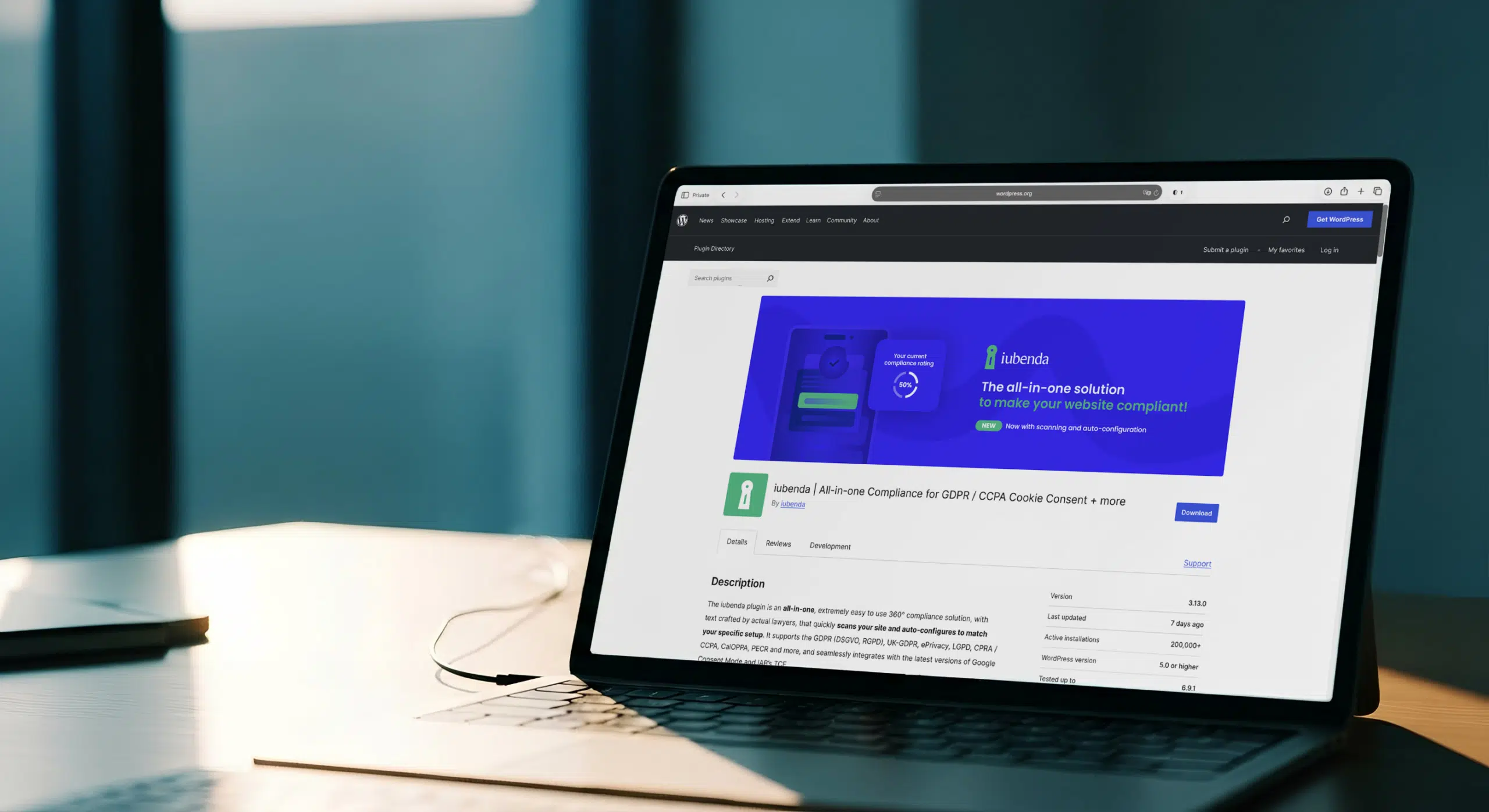
iubenda is a Google-certified CMP Partner, and Google Consent Mode v2 support is included in every plan, even the free one. Set up your consent banner, and we’ll pass each visitor’s choice to your Google Ads and Google Analytics tags.
FAQ
Does every CMP support Google Consent Mode v2?
No, not every CMP supports Google Consent Mode v2 in the same way. Google’s CMP Partner Program lists CMPs integrated with Consent Mode and Google Tag Manager, ranked Gold, Silver, or Bronze. You can use a CMP outside the program, but a listed partner makes setup simpler. Either way, check that your CMP sends all four v2 signals.
How do I turn off Google Consent Mode?
You turn off Google Consent Mode by switching off the Consent Mode integration in your CMP, or by removing the consent commands from your site’s code. Keep in mind that Google requires consent signals for users in the EEA, the UK, and Switzerland, so turning it off limits measurement, remarketing, and personalization for those users.
Is there a consent mode for Microsoft Ads?
Yes, Microsoft Advertising has its own consent mode for its Universal Event Tracking (UET) tag. It works on a similar idea: the tag adjusts what it collects based on the user’s consent choice. It’s separate from Google Consent Mode, so if you run both, make sure your CMP sends consent signals to each platform.
Why did my GA4 users drop after setting up Consent Mode?
GA4 user counts often drop after setting up Consent Mode because Google Analytics stops collecting full data from users who decline analytics cookies. In advanced mode, behavioral modeling can fill part of the gap once your property meets Google’s data thresholds. In basic mode, GA4 receives nothing from users who decline, so the drop reflects real consent choices.
Does Google Consent Mode replace a cookie banner?
No, Google Consent Mode doesn’t replace a cookie banner. Consent Mode only passes consent choices to Google’s tags. You still need a banner, usually run by a CMP, to ask for consent and record it. Regulations like the ePrivacy Directive require consent before a site stores non-essential cookies.
Do I need Google Consent Mode if I have no EEA visitors?
You may not need Google Consent Mode to meet Google’s requirement if you have no visitors from the EEA, the UK, or Switzerland. It still helps Google tags respect consent you collect under other laws, like US state privacy laws. And since June 2026, ad_storage controls whether GA4 shares advertising data with Google Ads in every region.
What are the most common Consent Mode implementation errors?
The most common Consent Mode implementation errors are setting the consent default after Google tags load, not sending the two v2 signals (ad_user_data and ad_personalization), and a banner that doesn’t send an update when the user chooses. Tag Assistant and the Google Ads Diagnostics tab flag most of these issues.