

If you run Meta ads, you’ve probably heard it’s a good thing to add the Conversions API to your Pixel setup. The reason is signal loss: ad blockers and browser limits stop some Pixel events before they reach Meta. This guide covers how the Conversions API works, which setup route fits you, and how consent carries over to server-side events.
In short
The Meta Conversions API (CAPI) is Meta’s server-side tracking option. Instead of relying only on the Meta Pixel in your visitor’s browser, it sends conversion events from a server straight to Meta. Meta recommends running it alongside the Pixel, with both streams deduplicated. Consent rules still apply, so build consent into the setup from day one.
In this guide:
- What is the Meta Conversions API?
- How the Conversions API works as server-side tracking
- Meta Pixel vs Conversions API: do you need both?
- Why use the Conversions API
- Conversions API and consent
- How to set up the Meta Conversions API
- Common Conversions API mistakes
- FAQ: Meta Conversions API
What is the Meta Conversions API?
The Meta Conversions API is a tool that sends data events, like purchases, leads, and sign-ups, from a server directly to Meta, rather than from the visitor’s browser through the Pixel. It’s how server-side tracking works for Meta ads on Facebook and Instagram. You’ll also see it called Meta CAPI, or by its old name, the Facebook Conversions API.
Server events land in the same place as browser events. According to Meta’s documentation, “Server events are linked to a dataset ID and are processed like events sent using the Meta Pixel.”
CAPI isn’t limited to your website. Each event carries an action source that tells Meta where the conversion happened: on a website, in an app, or in a physical store.
How the Conversions API works as server-side tracking
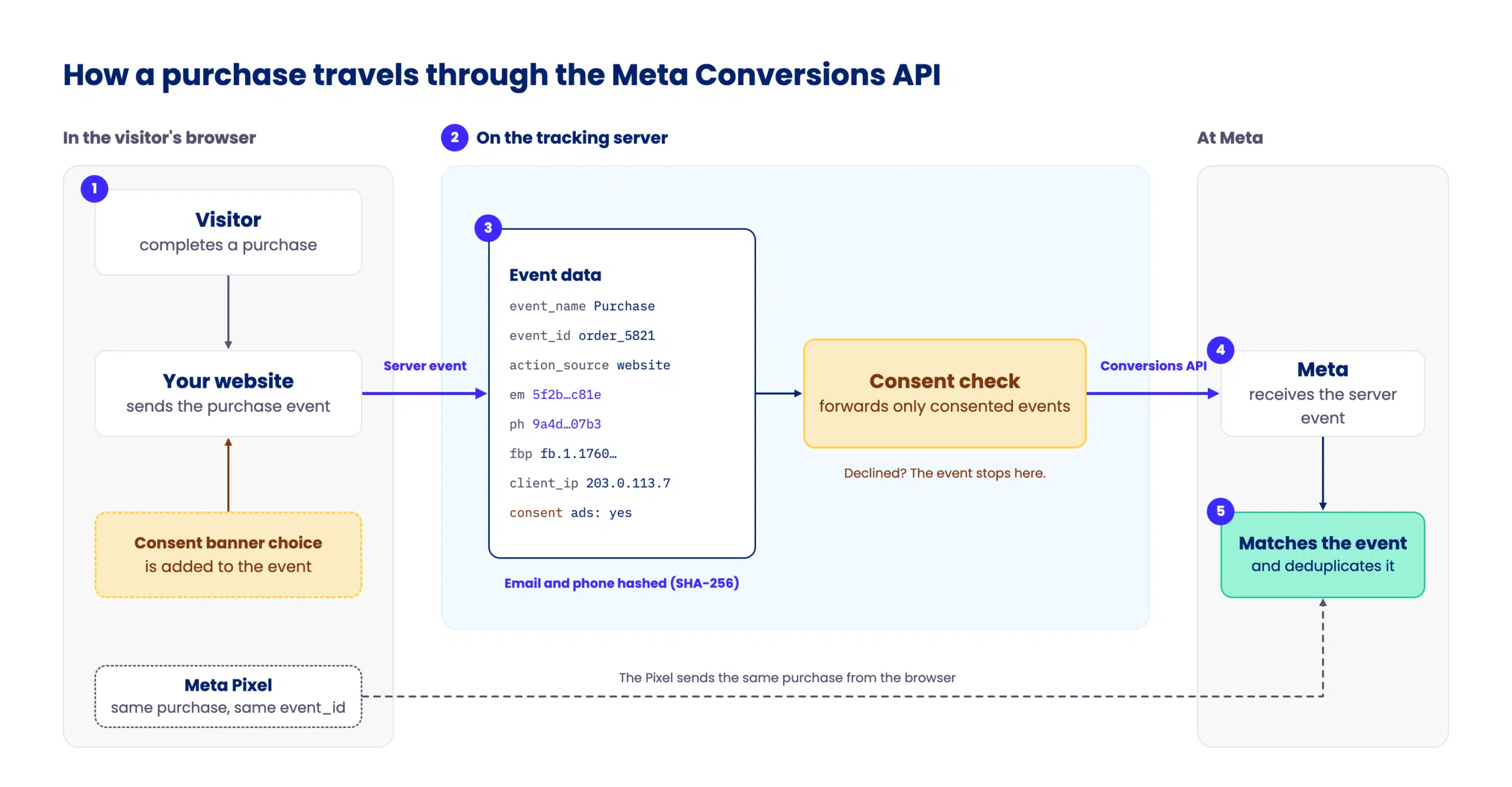
With the Pixel, the browser talks to Meta. With the Conversions API, a tracking server does. Here’s the path an event takes:
- A visitor takes an action, like completing a purchase or submitting a form.
- The event reaches a tracking server, sent from your site, your e-commerce platform, or your CRM.
- The server hashes customer details. It converts email addresses, phone numbers, and names with SHA-256 before sending the event.
- The server sends the event to Meta.
- Meta matches the event to an account and attributes it to your ads.
What data the Conversions API sends
Every server event needs four fields: event_name, event_time, action_source, and user_data, according to Meta’s parameter reference. Website events also need the page URL (event_source_url), and you can add business data like currency and order value in custom_data.
The user_data field has strict rules. Meta requires SHA-256 hashing for email, phone, name, date of birth, and location fields. A few values must stay unhashed: IP address, user agent, and the fbp and fbc parameters. fbp is Meta’s browser ID from the _fbp cookie, and fbc is the click ID from the _fbc cookie or the fbclid link parameter.
Deduplication: how event_id stops double counting
If the Pixel and the Conversions API both report the same purchase, Meta needs to know it’s one purchase. That’s what deduplication does. In Meta’s words, “a Meta Pixel’s eventID must match the Conversion API’s event_id,” and the event names must match too. Meta only deduplicates events received within 48 hours of each other.
Meta Pixel vs Conversions API: do you need both?
You don’t need to choose. Meta recommends running both together:
“For optimal ad performance, we recommend that advertisers implement the Conversions API alongside their Meta Pixel.”
Meta, Conversions API documentation
Meta calls this redundant, and deduplication prevents double-counting.
Here’s how the two compare:
| Meta Pixel | Conversions API | |
|---|---|---|
| Tracking type | Client-side | Server-side |
| Sends events from | The visitor’s browser | A tracking server |
| Affected by ad blockers and browser limits | Yes | Less so, so data is more accurate |
| Control over data before it’s sent | Limited | You choose which fields leave the server |
| Offline and CRM events | No | Yes |
| Setup effort | Code snippet or platform plugin | Varies by setup route |
Why use the Conversions API
Meta reports that advertisers with a Conversions API setup for web events saw an average 17.8% lower cost per result than advertisers without one. The figure comes from Meta’s April 2026 announcement and, according to Meta’s video guide, an experiment run in November 2025 with 5,926 advertisers.
Beyond that headline, CAPI helps you:
- recover events the Pixel misses because of ad blockers or loading/connectivity issues, as long as the server event doesn’t depend on the blocked Pixel request (it’s sent from your backend or through a first-party endpoint),
- send offline and CRM conversions as well as website events,
- decide which data reaches Meta before it leaves the server,
- share events as they happen, which Meta says helps campaigns get the best results.
Please note: CAPI recovers events from visitors who consented but whose Pixel was blocked. It doesn’t bring back events from visitors who refused consent, and it shouldn’t.
Conversions API and consent
Moving events to a server changes where data flows, but the consent requirement stays the same.
Server-side tracking doesn’t remove the consent requirement
European rules on tracking focus on storing or accessing information on a visitor’s device, not on which system sends the data onward. The European Data Protection Board (EDPB) makes this explicit in its Guidelines 2/2023 on the EU ePrivacy Directive: “the fact that the receiving entity might not be the entity instructing the sending of information does not preclude the application of Article 5(3) ePD.”
We cover this in depth in our article on whether server-side tracking needs consent under the General Data Protection Regulation (GDPR).
Meta’s own Business Tools Terms put the responsibility on advertisers. Where the law requires informed consent for cookies and device access, the EU being the example Meta gives, the terms require you, as the advertiser, to make sure, in a verifiable way, that people give the necessary consents before using Meta’s business tools. And regulators do look closely at Meta tracking, as the Austrian ruling on Meta’s Pixel showed.
How a visitor’s consent choice reaches server-side events
In a browser-only setup, a consent banner blocks the Pixel until the visitor agrees. Server-side, the consent choice has to travel with the event:
- Your consent management platform records the visitor’s choice.
- That signal goes with the event to the tracking server.
- The server forwards only consented events to Meta.
For visitors in certain US states, Meta also offers Limited Data Use, a flag that restricts how Meta processes events under US state privacy laws. It works for both Pixel and Conversions API events, and you have to turn it on yourself.
What to send and what to hold back
Send what your campaigns need, and nothing more. Hashing hides the raw identifiers, but a hashed email address is still personal data under the GDPR. It’s pseudonymized, not anonymized, so every field you add should earn its place.
How to set up the Meta Conversions API
Meta’s video guide walks through the main setup routes. The right one depends on how complex your tracking is and who runs the server-side part:
| Option | Good for | What it takes |
|---|---|---|
| Meta’s one-click setup | Simple websites that just want CAPI switched on | A few clicks in Events Manager |
| Your ecommerce platform’s integration | Shopify and other online stores | Turning on a setting in your store |
| A server-side tracking tool | Teams that want control over events and consent, to send data to several marketing platforms or for data enrichment | Connecting the tool, while the provider runs the server, like iubenda |
| Server-side Google Tag Manager | Teams already using Google Tag Manager | A tagging server, run by your team or a hosting provider |
| Direct integration | Custom setups | Developer team’s help |
Meta’s one-click setup vs a custom setup
Meta’s one-click setup is free and needs no code, according to Meta. It’s aimed at advertisers with low event coverage, and existing partner or custom setups see no change.
The one-click setup is a good fit for simpler setups. For more complex configurations, where you need control over events, data, and consent, a direct integration or a server-side tracking tool is the better fit.
As of October 2026, here’s how it compares:
| Meta’s one-click setup | Custom or partner setup | |
|---|---|---|
| Events sent | Mirrors what the Pixel sends | You choose |
| Parameters per event | Whatever the Pixel sends | You choose and enrich |
| Filtering data before Meta | No | Yes |
| App and offline events | No, web only | Yes |
| Other ad platforms from the same tracking server | No, Meta only | Yes |
| Consent handling | Not documented by Meta | You control what’s forwarded |
Setup checklist
- Choose the events that matter, like purchases and leads.
- In Events Manager, find your dataset ID and generate an access token.
- Configure your chosen route.
- Set up deduplication with matching
event_idandevent_namevalues. - Send test events and confirm Meta receives them.
- Check your Event Match Quality score.
- Confirm that only consented events reach Meta.
Common Conversions API mistakes
- Skipping deduplication: without matching event IDs, the Pixel and Meta CAPI can count the same conversion twice.
- Forwarding events without consent: server-side events need consent just like Pixel events.
- Getting hashing wrong: Meta requires hashed email and phone values, while IP address, user agent,
fbp, andfbcmust stay unhashed. - Leaving out
fbpandfbc: without them, match quality drops. When the Pixel is blocked, these cookies are often missing too, so match quality depends more on the hashed customer details you send. - Sending events late: Meta accepts events up to seven days old, but real-time sharing gets better results.
Want the control of a custom setup without running a server? iubenda’s server-side tracking tool forwards events to the Meta Conversions API and other ad platforms only after checking each one against the visitor’s consent record.
Server-side tracking with compliance built-in
Easily set up the compliance part too
FAQ: Meta Conversions API
Is the Meta Conversions API free?
Yes, the Meta Conversions API is free to use: Meta doesn’t charge for sending events. Meta’s one-click setup has no cost either. Other routes can carry costs, though: partner tools, hosting for a tagging server, or developer time for a direct integration.
Is the Conversions API worth it?
The Conversions API is worth it for many advertisers, based on Meta’s own figures. Meta reports an average 17.8% lower cost per result for advertisers with a Conversions API setup for web events, and recommends using it alongside the Pixel. Since the figure comes from Meta themselves, try it out and measure the effect on your own campaigns.
Is the Conversions API mandatory for Meta ads?
No, the Conversions API isn’t mandatory for Meta ads. You can still run and measure campaigns with the Meta Pixel alone. Meta does recommend implementing the Conversions API alongside the Pixel for optimal ad performance, because server-side tracking can capture events the browser misses.
What does CAPI stand for?
CAPI stands for Conversions API. In the Meta ads world, it refers to the Meta Conversions API, formerly the Facebook Conversions API. It’s Meta’s server-side tracking tool, which sends conversion events from a server to Meta instead of from the visitor’s browser.
Can you set up the Facebook Conversions API with Google Tag Manager?
You can set up the Facebook Conversions API with Google Tag Manager, using a server-side container. Meta provides a Conversions API tag for server-side Google Tag Manager, which forwards events from your tagging server to Meta. You’ll need a tagging server set up first. Our guide to server-side Google Tag Manager walks through the setup.
What is Meta’s Limited Data Use?
Meta’s Limited Data Use is a setting that restricts how Meta processes data from people in certain US states, to support compliance with state privacy laws. You turn it on by adding a data processing flag to each event you send through the Pixel or the Conversions API. Meta doesn’t apply it automatically.