

Your ad platform reports fewer conversions than your store actually recorded. Sound familiar? Often, the gap comes down to one choice: client-side vs server-side tracking.
Client-side tracking sends data from the visitor’s browser straight to each vendor like Meta and Google. Server-side tracking sends it to a tracking server first, which then forwards it. That one change affects how much data you keep, how fast your pages load, and how much say you have over what each vendor receives.
In short
Client-side tracking sends data from the visitor’s browser straight to each vendor. Server-side tracking routes it through a tracking server first, so you lose less consented data and control what each vendor gets, at an ongoing cost. User consent is required either way.
In this guide:
- What is client-side tracking?
- What is server-side tracking?
- Client-side vs server-side tracking: key differences
- Why client-side tracking loses data
- Does server-side tracking still need consent?
- Checklist: which one should you use?
- FAQ: client-side vs server-side tracking
What is client-side tracking?
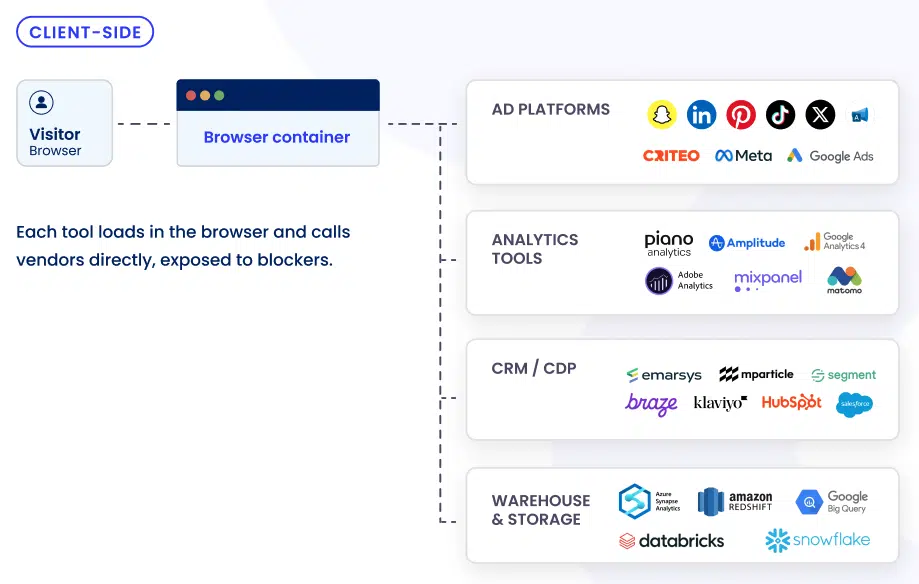
Client-side tracking is the standard way websites measure what visitors do, like which pages they view, how they move through your site, which ad brought them in, and whether they buy or sign up. Tags, pixels, and scripts load in the visitor’s browser, and each one sends data directly to its own vendor, such as Meta, Google Analytics, or Google Ads.
Say someone lands on your product page from an Instagram ad. The Meta Pixel fires in their browser and reports the visit to Meta. Google Analytics does the same for Google, separately.
It’s popular for good reasons. You paste a snippet and it works, and it’s usually free. The trade-off: every script runs in the visitor’s browser, where browser limits and ad blockers can stop it, and each one adds weight to the page.
What is server-side tracking?
Server-side tracking moves marketing data collection from the browser to a server. Instead of calling every vendor, the browser sends a single stream of events to a tracking server on a subdomain of your website. The server gives you more control over the data (filtering, enrichment), and only then forwards it to platforms like Google and Meta.
It doesn’t mean building a server yourself. Most marketing teams use a managed solution: the provider runs the infrastructure, and you manage the rules from a dashboard. For the full picture, here’s how server-side tracking works.
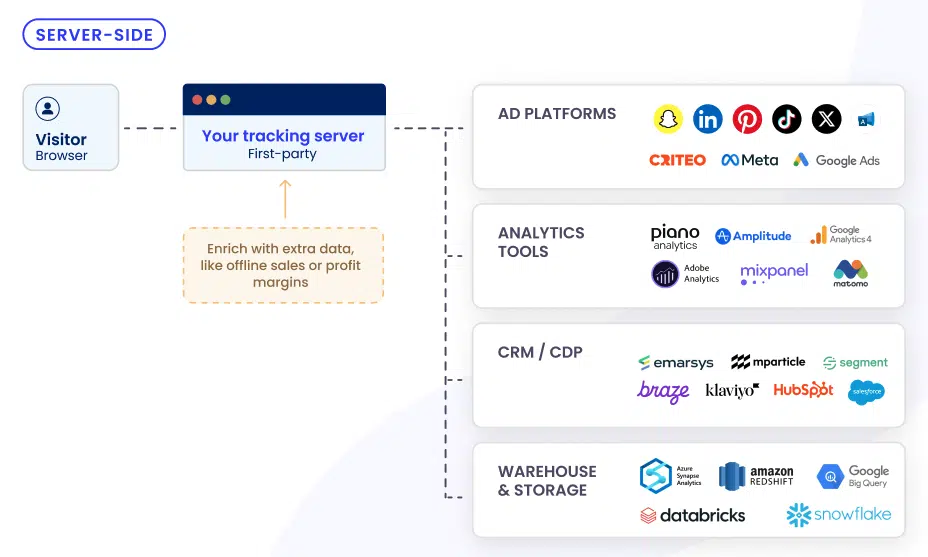
Because the tracking server sits on a subdomain of your website, data collection happens in a first-party context. The browser talks to your site instead of a vendor’s domain, and the server can set first-party cookies itself. That’s what makes server-side tracking the foundation of a first-party data strategy.
Client-side vs server-side tracking: key differences
Here’s a side-by-side comparison of client-side tracking vs server-side tracking.
| Client-side tracking | Server-side tracking | |
|---|---|---|
| Where data is collected | In the visitor’s browser | On a tracking server, which receives one stream of events from the browser |
| Who decides what vendors receive | Each vendor’s script, which can read the whole page | You, by filtering and cleaning data (hashing) before it’s forwarded |
| Exposure to ad blockers and browser limits | High: scripts call vendor domains directly | Lower: the browser only talks to your own subdomain |
| Cookies | Third-party vendor cookies plus first-party cookies set in the browser | Mostly first-party cookies, set by the server and longer-lived |
| Page speed | Every script adds weight to the page | Fewer scripts in the browser, so pages load faster |
| Setup | A code snippet | A tracking server and custom subdomain, or a dedicated managed solution (server-side tracking tool) |
| Cost | Usually free | Ongoing hosting or subscription costs |
| User consent | Required | Required |

Why client-side tracking loses data
With client-side tracking, every tag calls its vendor straight from the browser, so every request is out in the open. Browsers now limit tracking by default, through Safari’s Intelligent Tracking Prevention (ITP) and Firefox’s Enhanced Tracking Protection (ETP). Ad blockers became widely used and started out stopping ads. Most now block the tracking scripts that come with them, too.
Server-side tracking changes the route. The browser only talks to a tracking server on your own subdomain, so the request looks like first-party traffic rather than a known tracker. The server then forwards data to Google or Meta server-to-server, where ad blockers have no visibility. This doesn’t override anyone’s choice. Ad blockers exist to stop data collection people never agreed to, and server-side keeps the measurement they did consent to.
Server-side tracking isn’t bulletproof, but it can help recover a good chunk of data. Some ad blockers block a tracking subdomain once they identify what it’s for, so server-side makes data loss less likely, not impossible. And lost data has a real cost: your ad platforms optimize on part of the picture, and your budget follows.
Does server-side tracking still need user consent?
Yes, server-side tracking still needs consent. Moving tracking to a server changes where data is processed, not whether you need permission to process it. The EU ePrivacy Directive requires consent before anything reads from or writes to a visitor’s device, and the General Data Protection Regulation (GDPR) governs the personal data you handle afterward. For the legal details, read whether server-side tracking is GDPR compliant.
In a well-built setup, consent works as the gatekeeper. Your consent management platform decides:
- which cookies and identifiers your site can set,
- when tracking can start,
- which vendors receive data.
Connect your consent management platform to the tracking server, and the server only forwards data the user agreed to share. Visitors make that choice in your consent banner.
Checklist: which one should you use?
Should you use client-side or server-side tracking? It depends on how much your budget relies on conversion data, and whether consent is already in place. Run through the following questions.
- Start here: do you collect consent through a consent management platform? If not, set that up first. A tracking server only forwards what users agreed to share, so without a consent layer, there’s nothing reliable to send. iubenda has integrated a system for both consent management and server-side tracking for an easy setup.
Server-side tracking is likely worth it if you answer yes to several of these:
- Do you spend on ads and need accurate conversion data to optimize your campaigns?
- Do your ad platforms report fewer conversions than you actually sold? This is the clearest signal, because that gap is where wasted budget hides.
- Does attribution drive real budget decisions, beyond reporting?
- Are you building first-party data you need to use reliably across your tools?
- Do you have the technical help to run a tracking server, or are you open to a managed solution that handles it for you?
Client-side tracking may be enough for now if you answer yes to these:
- Is basic analytics (traffic, top pages, sources) all you need?
- Are you running little or no paid advertising?
- Would the cost and upkeep of a tracking server outweigh the data it recovers?
- Is your reported conversion count already close to your real sales?
You don’t have to switch everything at once. Meta, for example, recommends running its Conversions API alongside the Meta Pixel, so the two setups work together. Server-side Google Tag Manager is another common place to start.
Before you switch, run both side by side for a week or two and compare each against your real sales.
Server-side tracking with compliance built-in
FAQ: client-side vs server-side tracking
Does server-side tracking use cookies?
Yes, server-side tracking still uses cookies, just fewer third-party ones. Data reaches vendors server-to-server, so the third-party cookies their scripts used to drop in the browser become largely unnecessary. Your site still uses first-party cookies to recognize returning visitors, and a server can set them itself. Because cookies are still in play, consent requirements stay the same.
Can ad blockers block server-side tracking?
Ad blockers can block server-side tracking, but it’s much less likely. The browser sends data to a subdomain of your own site instead of to the vendor domains blockers watch for, so requests look like first-party traffic. Some blockers do block a tracking subdomain once they identify its purpose, so server-side reduces data loss without removing it.
What’s an example of server-side tracking?
A common example of server-side tracking is the Meta Conversions API. Instead of relying only on the Meta Pixel in the browser, a server sends conversion events, like a purchase, straight to Meta. Meta recommends running it alongside the Pixel, with both streams deduplicated so each purchase counts once.
Is server-side tagging the same as server-side tracking?
Server-side tagging and server-side tracking mean almost the same thing, and most people use the terms interchangeably. Strictly speaking, tagging describes the setup: the containers and triggers that process events. Tracking describes the goal: measuring user actions and conversions. So choosing between server-side and client-side tagging is the same decision as choosing how you track.