

Your campaigns generate more data than ever, but is it reaching your reports? Ad blockers, browser restrictions, and consent gaps now intercept a meaningful slice of signals from campaigns before it reaches your analytics or ad platforms. Server side tracking is the response you hear about from agencies, ad reps, and GTM tutorials, and it’s worth understanding properly.
In the IAB State of Data 2024 report, 95% of advertising and data decision-makers said they expect continued signal loss, and over half expect it to get harder to attribute campaign performance, measure ROI, and track conversions.
For most teams, the damage shows up quietly: you make 100 sales, but your ad platform reports 60. Budgets shift toward campaigns that only look like they’re underperforming, and the cycle repeats.
This guide explains what server-side tracking is, how it works, why it’s worth it, and the one thing it doesn’t change: your consent obligations.
In short
Server-side tracking, also sometimes referred to as server-side tagging, sends your website’s events to a tracking server first, which cleans and forwards them to your analytics and ad platforms. You get more accurate conversion data, faster pages, and more control over what each vendor receives. One thing it doesn’t change: tracking still needs user consent, so your consent management platform stays at the center of the setup.
We’ve put everything in this article (and more!) into one white paper you can keep.
No form, no email, just the PDF.
In this guide:
- What is server-side tracking?
- Server-side tagging vs. server-side tracking: what’s the difference?
- Client-side vs. server-side tracking: what’s the difference?
- How does server-side tracking work?
- Benefits of server-side tracking
- Do you need server-side tracking?
- Does server-side tracking replace cookie consent?
- Server-side tracking setup by platform
- How to set up server-side tracking: a step-by-step checklist
- Common server-side tracking mistakes to avoid
- FAQ: server-side tracking
- Where to start
What is server-side tracking?
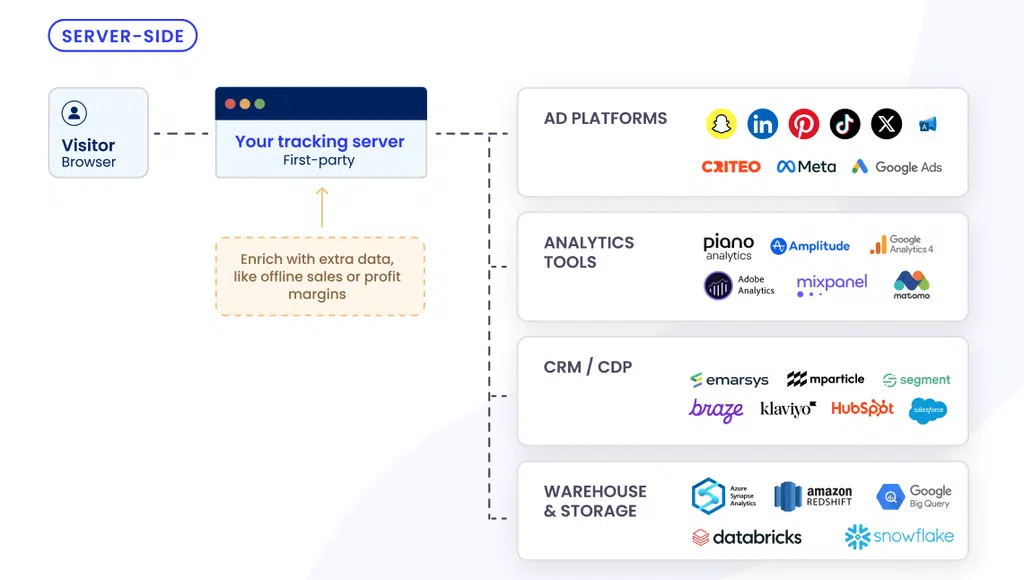
Server-side tracking is a method of collecting website data where the visitor’s browser sends events to a single tracking server, and that server processes the data and forwards it to your analytics and ad platforms. Instead of dozens of third-party scripts each sending data straight from the browser to their own vendor, one stream goes to a server first.
That order matters. You collect the data first, decide what’s useful, clean it, and only then send out what’s needed and consented. More control for you, more privacy for your visitors.
One reassurance up front: this doesn’t mean building a server. Most marketing teams use a managed solution, where the provider runs the infrastructure and your work happens in a dashboard. You manage incoming data and control what leaves for each vendor.
You’ll also see the term “server-side tagging”. The two are close but not identical, and the next section explains exactly where they differ.
If you want a refresher on how tracking works in general, start with our guide to how website tracking works.
Server-side tagging vs server-side tracking: what’s the difference?
The difference between server-side tagging and server-side tracking is that tagging describes the setup and tracking describes the result. Server-side tagging is the architecture: your tags run in a container on a server instead of in the visitor’s browser. Server-side tracking is what that gets you: cleaner data, fewer scripts on the page, and events that reach your platforms even when a blocker would have stopped them.
Most marketers use the two interchangeably, and that’s usually fine. The precise distinction is architectural.

Client-side vs. server-side tracking: what’s the difference?
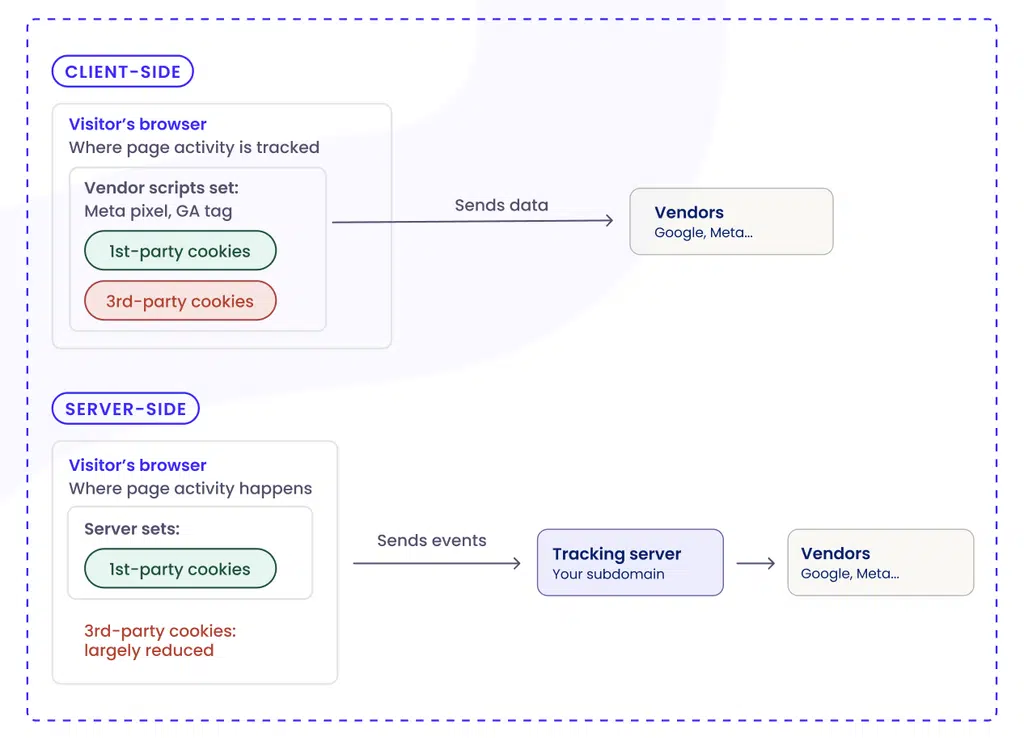
Whether you call it client-side vs. server-side tagging or tracking, the difference comes down to where data is collected and who controls it before vendors see it. For a full side-by-side, here’s how client-side and server-side tracking compare.
| Client-side tracking | Server-side tracking | |
|---|---|---|
| Data collection point | The visitor’s browser | A tracking server |
| Data control | Low: scripts can collect more than they should | High: you filter and clean data before sending it to vendors |
| Accuracy | Weakened by ad blockers and browser limits | Holds up against blockers; consented events are accurate |
| Page performance | Heavy: every vendor script loads in the browser | Light: fewer scripts on the page |
| Setup | Simple code snippet | Server infrastructure or a managed solution |
| Cost | Usually free | Hosting costs or a subscription with a dedicated tool |
How client-side tracking works
Client-side tracking is the classic setup. Tags, pixels, and scripts load directly in your visitors’ browsers, and each one sends data straight to its own third party: Meta, Google Analytics, Google Ads, and dozens more.
It worked well when browsers cooperated, and users rarely blocked anything. That’s no longer the case. Safari’s Intelligent Tracking Prevention (ITP) and Firefox’s Enhanced Tracking Protection (ETP) can restrict tracking by default, and ad blockers are everywhere.
A common misconception worth clearing up: Google confirmed in 2025 that Chrome will not remove third-party cookies after all. That doesn’t mean the problem went away. Safari, Firefox, and Edge already restrict them, ad blockers keep spreading, and privacy regulations are still fully relevant. The signal loss is real regardless of what any single browser decides.
How server-side tracking works instead
With server-side tracking, the browser sends one stream of data to a tracking server, typically through a subdomain you own. Vendors receive their data from that server, not from the visitor’s browser. Because the browser only talks to your domain, the request looks like normal first-party traffic, so it holds up against ad blockers and browser limits. The sections below walk through exactly how that happens.
How does server-side tracking work?
Server-side tracking follows four steps:
- The browser sends an event to a tracking server. A visitor clicks, signs up, or buys, and the event travels to the server through your own subdomain.
- The server receives and processes the event. This is usually a server-side container: a cloud-hosted environment that ingests events and applies your rules.
- The server filters and enriches the data. You drop what you don’t need, hash or remove personal details, and add context (like order value) before anything leaves.
- The server forwards clean data to your platforms. GA4, Meta, Google Ads, and the rest receive their events server-to-server.
The role of a server-side container
The most common implementation is a server-side Google Tag Manager container, usually shortened to server-side GTM or sGTM. In Google Tag Manager, server-side setups run two containers: the web container on your site, and the server container in the cloud. You can host that server container yourself, or use a managed solution where the provider runs it for you and you keep the configuration: your tracking setup and your rules.
Why a first-party subdomain matters
At its core, an ad blocker does what its name says: stop online ads from appearing. Over time, most blockers extended their reach from ads to the tracking scripts that come with them. Essentially, ad blockers stop third-party scripts from collecting data users never agreed to.
Server-side removes those scripts from the page altogether. What survives isn’t tracking that slipped past the blocker, but first-party measurement the user consented to, which was never what the blocker was built to stop. The browser only talks to your own subdomain, so the request looks like first-party traffic rather than a known tracker, and it’s less likely to trip the blocklist. Your server then forwards the data to vendors server-to-server, where ad blockers have no visibility.*
*Some ad blockers go further and block a tracking subdomain outright once they identify that its purpose is data collection. Server-side tracking makes signal loss much less likely, but not impossible.
Benefits of server-side tracking
The benefits of server-side tagging fall into four areas, and they compound.
More accurate data and attribution
This is the benefit most marketing teams notice first. Because you can receive tracking data via a server on your own domain, your tracking holds up better against ad blockers and browser limits. For example, Safari’s Intelligent Tracking Prevention caps cookies written by JavaScript in the browser at 7 days. Cookies set by a server in the HTTP response can last longer, though Safari also caps these at 7 days where the tracking subdomain resolves to a third party. That means that how the subdomain is configured matters.
Server-side tracking surfaces conversions that were really happening but went unreported. That hits the metric advertisers care about most: return on ad spend (ROAS).
Richer data
Because every event passes through a server first, you can connect that server to your own systems, like your CRM or order database, and add context before forwarding. This is called server-side data enrichment, and Google’s value-based bidding and conversion value rules are built for exactly this kind of input.
Attach a purchase’s profit margin or a customer’s lifetime value to the event, and you can tell the algorithm to chase profit and high-value customers, not just top-line sales.
Faster pages
Every tracking script adds weight the browser has to download and run while your page is trying to render, which slows things down, especially on mobile.
Server-side tracking moves most of that work off the browser. Fewer scripts on the page means faster loads, better Core Web Vitals, and stronger SEO. Speed translates into revenue too: a site that loads in 1 second converts up to 3x better than one that takes 5 seconds.
A stronger compliance posture
Routing every event through a single tracking server turns data governance into something you actually enforce. The server is the one checkpoint every event passes through, so it’s where you set the rules:
- Send only what you need. Data minimization is a core principle of the General Data Protection Regulation (GDPR). Server-side makes it practical: forward the fields a vendor needs to record a conversion and drop the rest.
- Hash or remove personal data. For each destination, you decide what leaves: strip the field, hash it, or pass it through. Attention: hashing is pseudonymization, not anonymization. A hashed email is still considered personal data and needs a lawful basis. But still, hashing limits what a vendor can do with the field beyond the match it needs. One practical note: each vendor sets minimum requirements for what an event must contain to be accepted and matched, so how much you can strip depends on the destination.
- Stop data leakage at the source. Because the handoff is server-to-server, third-party scripts can’t scrape the browser for information they aren’t authorized to collect.
- Keep an audit trail. Log every data flow and build the kind of record regulators increasingly expect.
First-party data: the asset you’re really building
Everything above adds up to one strategic shift: building a data asset you own, instead of renting signals from third parties that are disappearing. First-party data is information you collect directly through your own channels, and it’s more reliable and more privacy-friendly than third-party data.
The industry has already moved: 71% of brands, agencies, and publishers are increasing their first-party datasets, and BCG found that companies linking their first-party data sources generated 1.5 times the incremental revenue from a single ad placement, and twice the improvement in cost efficiency.
The catch: first-party data only works if you can collect it lawfully, activate it across your tools, and use it. Consent decides all three: get the consent layer wrong, and every tool downstream inherits the gap.
As Andreea Mandeal, CMO of iubenda, puts it for the IAB Tech Lab, without a reliable consent framework, first-party data “cannot be confidently used by any team downstream.”
Do you need server-side tracking?
Before you invest in server-side tracking, run a quick gut check against the questions below. Ask yourself:
- Do you spend on ads and need accurate conversion data to optimize campaigns?
- Compare the conversions your ad platform reports with what you actually sold. Do the numbers line up?
- Does accurate attribution drive real budget decisions, not just reporting?
- Are you building a first-party data strategy you need to activate reliably?
- Do you already collect data through a proper consent layer?
→ If you answered yes to several of these, server-side tracking is likely worth the investment now. The signal to watch most closely is the gap between reported and real conversions, because that’s where wasted budget hides.
→ It may not be the right moment if your analytics needs are basic and you’re not running ad spend, or if you lack the technical resources and aren’t ready to use a managed solution that handles most of the complex work for you. The same goes if you don’t yet collect data through a consent layer.
Does server-side tracking replace cookie consent?
No, server-side tracking does not replace cookie consent. Server-side tracking changes where your data is processed, not whether you need permission to process it. If your tracking required consent when it ran in the browser, it still requires consent when it runs on a server. It’s also the most persistent myth about server side tracking and GDPR, so it’s worth unpacking.
Why server-side tracking still needs a valid legal basis under GDPR
The GDPR requires a legal basis for processing personal data (Article 6), and for most marketing tracking that basis is consent. The EU ePrivacy Directive (the “cookie law”) adds its own rule: storing or accessing identifiers on a user’s device generally requires consent, no matter where the data travels afterwards.
Moving tracking to a server changes the architecture, not the obligations:
- A consent management platform (CMP) remains the piece that captures each visitor’s choice.
- Your cookie consent management setup must pass that choice to the tracking server so it only forwards consented data.
- Your privacy and cookie policy also needs to reflect what you collect and who receives it; a privacy policy generator keeps that documentation aligned with your actual setup.
Because server-side processing is less visible to users than scripts in the browser, transparency matters more, not less.
In practice, it rests on three things:
- a consent banner that explains server-side processing and why each vendor receives data,
- consent passed to every partner with each event,
- a logged record of consent proof so you can show who agreed to what.
One known challenge to plan for: on a visitor’s very first interaction, their consent status isn’t known yet. Getting the consent layer and the server to talk to each other cleanly in that moment takes careful setup.
Server-side tracking is a more privacy-aware marketing tracking method
Server-side is a more respectful way to handle user data, because everything passes through one checkpoint before it reaches anyone else, and that changes what your visitors are exposed to.
The same architecture that recovers your signal also gives you more control over the data: consented data is handled with more care, and unconsented data doesn’t travel at all.
Another privacy-aware tracking recovery implementation marketers should look into is Google Consent Mode. It tells Google’s tags how to behave based on what each user chose on your consent banner. When someone accepts, tracking runs normally. When someone declines, the advanced setup sends limited, cookieless pings that fill the gap through aggregate modeling rather than individual tracking.
- Server-side tracking captures as much of your consented data as possible, the part that could slip away.
- Consent Mode covers what’s left, filling the gap for users who decline.
Together they give you a fuller, privacy-aware picture of performance, and both depend on your CMP to capture valid consent in the first place.
Server-side tracking setup by platform
Server-side tagging works a little differently on each platform. GA4, Meta, Google Ads, Shopify, and WordPress each have their own server-side mechanism, but they all follow the same pattern: the tracking server sends events straight to the platform’s servers, with no browser in between.
| Platform | Server-side mechanism | What you need |
|---|---|---|
| GA4 | Server-side GTM container | An sGTM container (self-hosted or managed) with a GA4 tag |
| Meta (Facebook and Instagram) | Conversions API (CAPI) | A CAPI connection, usually via sGTM or a platform integration |
| Google Ads | Enhanced conversions and server-side conversion tracking | Conversion tags routed through the same server container |
| TikTok, LinkedIn, Microsoft Ads | TikTok Events API, LinkedIn Conversions API, Microsoft Ads UET | The platform’s server-to-server API, fed from the tracking server |
| Shopify, WooCommerce, WordPress | sGTM or platform integrations | A connection between your store or site and the server container |
A few notes to set expectations:
- GA4 and Google Ads use the same server container, so once one is set up, the other usually follows with little extra work.
- Meta, TikTok, LinkedIn, and Microsoft Ads each have their own way of receiving events from a server (Meta calls it the Conversions API), but the idea is always the same: events reach the platform directly, not through the browser.
- Shopify and WooCommerce connect through integrations, so purchases are recorded from your store rather than the buyer’s browser.
How to set up server-side tracking: a step-by-step checklist
Here’s what implementation generally looks like, whichever tools you choose:
- Set up the server layer. Create a tracking server in the cloud, most commonly an sGTM container. Host it yourself or use a managed solution that runs it for you (much easier).
- Point a custom subdomain at it. Create a subdomain on your own domain (like
analytics.yourdomain.com) and route it to the server with a DNS record. - Connect your CMP. Wire consent signals into the server so nothing fires before a visitor has made their choice. This step keeps the whole pipeline honest.
- Decide what gets through. Define what to filter, enrich, or block before any data is forwarded to a vendor.
- Connect your destinations. Send events on to the platforms you use: GA4, Meta CAPI, Google Ads, and the rest.
- Update your privacy documentation. Make sure your privacy and cookie policy reflect the data flows and the vendors receiving data.
- Run both setups in parallel. Keep client-side tracking on for a week or two and compare numbers. If they line up, you can trust the new pipeline.
- Monitor and maintain. Check consent signals, data flows, and what each vendor receives, and keep watching as platforms and rules change.
Plan for the team you’ll need: marketing owns the tracking configuration and goals, and a developer handles the subdomain and routing. With a managed solution, the technical load shrinks considerably.
Common server-side tracking mistakes to avoid
Server-side setups are powerful, which also makes them easy to misconfigure. The most common failure modes:
- Duplicated conversions. Running a browser pixel and a server-side connection without deduplication counts the same purchase twice, and inflated numbers are as misleading as missing ones.
- Unhashed PII in server payloads. More data access means more responsibility. Hash or strip identifiers before events leave the server.
- A misconfigured first-party subdomain. If the DNS routing is wrong, you lose the connection and may not notice for weeks.
- Ignoring consent state in server payloads. The server must receive and respect each visitor’s choice on tracking, including on the tricky first visit. Forwarding unconsented events from a server is still unconsented tracking and fails to be compliant.
- Treating server-side as invisible. Users can’t see server-side processing the way they can inspect cookies, so explain it openly in your consent banner and privacy documentation. Transparency matters even more than ever when there’s reduced visibility.
Where to start
Server-side tracking gives you back the signal you’re losing and more control over what leaves your site. But the data it recovers is only usable if consent travels with it. Accurate measurement and respect for user privacy aren’t competing goals; the strongest setups treat them as the same one.
Server-side tracking with compliance built-in
Easily set up the compliance part too

FAQ: server-side tracking
Is server-side tracking GDPR compliant?
Server-side tracking supports GDPR compliance, but it doesn’t deliver it on its own. It changes where data is processed, not whether the GDPR applies. Processing personal data requires a legal basis wherever it runs, so your obligations stay the same. The one real difference: the server lets you filter what leaves, and data that can no longer be linked to a person (truly anonymized data) isn’t personal data under the GDPR.
Does server-side tracking need cookie consent?
Yes, server-side tracking needs cookie consent. The consent requirement attaches to the moment something reads from or writes to a visitor’s device, not to where the data travels afterwards. If a tracker required consent running in the browser, the equivalent server-side flow requires it too. Your CMP needs to pass each visitor’s choice to the tracking server so only consented data is forwarded.
Is server-side tagging legal?
Yes, server-side tagging is legal if your user consent infrastructure is well set up. What makes tracking lawful isn’t where it runs, it’s whether you have a legal basis for it. Moving your tags to a server changes the architecture, not your obligations: if a tracker needed consent in the browser, it needs consent server-side too. We strongly recommend using a consent management platform like iubenda that passes each visitor’s choice to the tracking server so only consented data gets forwarded.
Is server-side tracking hard to set up?
Server-side tracking takes real setup work, and how much depends on the route you take. Building it yourself is complex and requires developer time: setting up the container, the subdomain, the server, the routing, and maintaining it all over time. With a managed solution, most of that technical work disappears. The provider runs the server, and your part happens in a dashboard: deciding what to collect, filter, and forward.
Do I need Google Tag Manager for server-side tagging?
No, you don’t need Google Tag Manager for server-side tagging, though server-side GTM is the most common route. Any setup that receives events on a server and forwards them to your vendors counts. sGTM is popular because it’s free to configure, works with GA4 and Google Ads out of the box, and has the largest pool of documentation behind it.
How much does server-side tagging cost?
The cost of server-side tagging comes from cloud hosting for the server container, billed on how much traffic you send through it. If you use a managed subscription rather than hosting it yourself, this comes into your subscription fees. Same thing for the setup and maintenance time, which is the one teams underestimate. So the cost is about hosting, setup, and maintenance with your team’s (i.e., developers’) time on this.
Does server-side tracking replace cookies entirely?
No. Server-side tracking reduces how much your tracking depends on cookies, without eliminating them. The forwarding to vendors happens server-to-server, so the third-party cookies that vendor scripts used to drop in the browser become largely unnecessary. Your site still typically uses first-party cookies to recognize returning visitors, now set by the server and more durable. Consent requirements for those cookies stay the same.
Client-side vs. server-side tracking: which should I use?
Choose server-side tracking if you spend on ads, need accurate conversion data, or are building a first-party data strategy. Client-side may still be enough if your needs are basic and you don’t run ad campaigns.